


Short answer: I went with the blue. Before a New Year's Eve party I put a midnight blue velvet blazer over a full-length photo of my own shirt and trousers, using TryAnyOutfit's virtual try-on with the Jacket worn open chip. A second run with the note "make the blazer black" gave me a rough look at the other colour. I preferred the blue by a mile. For the size, I measured a blazer I already own against the size chart.

The blazer I was stuck on, with the boots I already had.
Tom's message came in the first week of November: New Year's Eve at his flat, eighth floor, fireworks from the window, "dress up a bit." Tom's "a bit" usually means the rest of the room turns up in sequins.
I already had the bottom half. Black trousers that fit, a white shirt I iron for weddings, black Chelsea boots. What I didn't have was anything that said it was a party and not a funeral.
For two weeks I'd had a velvet blazer open in a tab. Single-breasted, midnight blue, soft shoulders. The shop sold it in black too. And I had a real problem with that black version, because the only photo of it was one flat shot on a dark grey background where the jacket basically disappeared. I've never worn velvet. I had no idea which colour would look like me and which would look like a magician.
 The kind of night I was dressing for. Everyone ends up by the window at midnight, phones out.
My photo, their blazer
I took the photo first. Hallway wall, flat light from the ceiling, phone propped on the shoe rack with a timer. White shirt tucked in, black trousers, the boots. Arms a little away from my sides, facing the camera, head to toe in frame. I took four and kept the one where I wasn't squinting.
Then I opened the virtual try-on page on my laptop. A sample outfit is already sitting in the Outfit box when the page loads. That evening it was the polka-dot jacket from the site's own collection. I hit Replace and added a screenshot of the midnight blue blazer from the shop, cropped so the size buttons and the "complete the look" row weren't in it. My hallway photo went in the You box.
Under the chips (Top only, Bottom only, Jacket worn open, Sleeves rolled up) I tapped Jacket worn open, because I'd never button a blazer at a party.
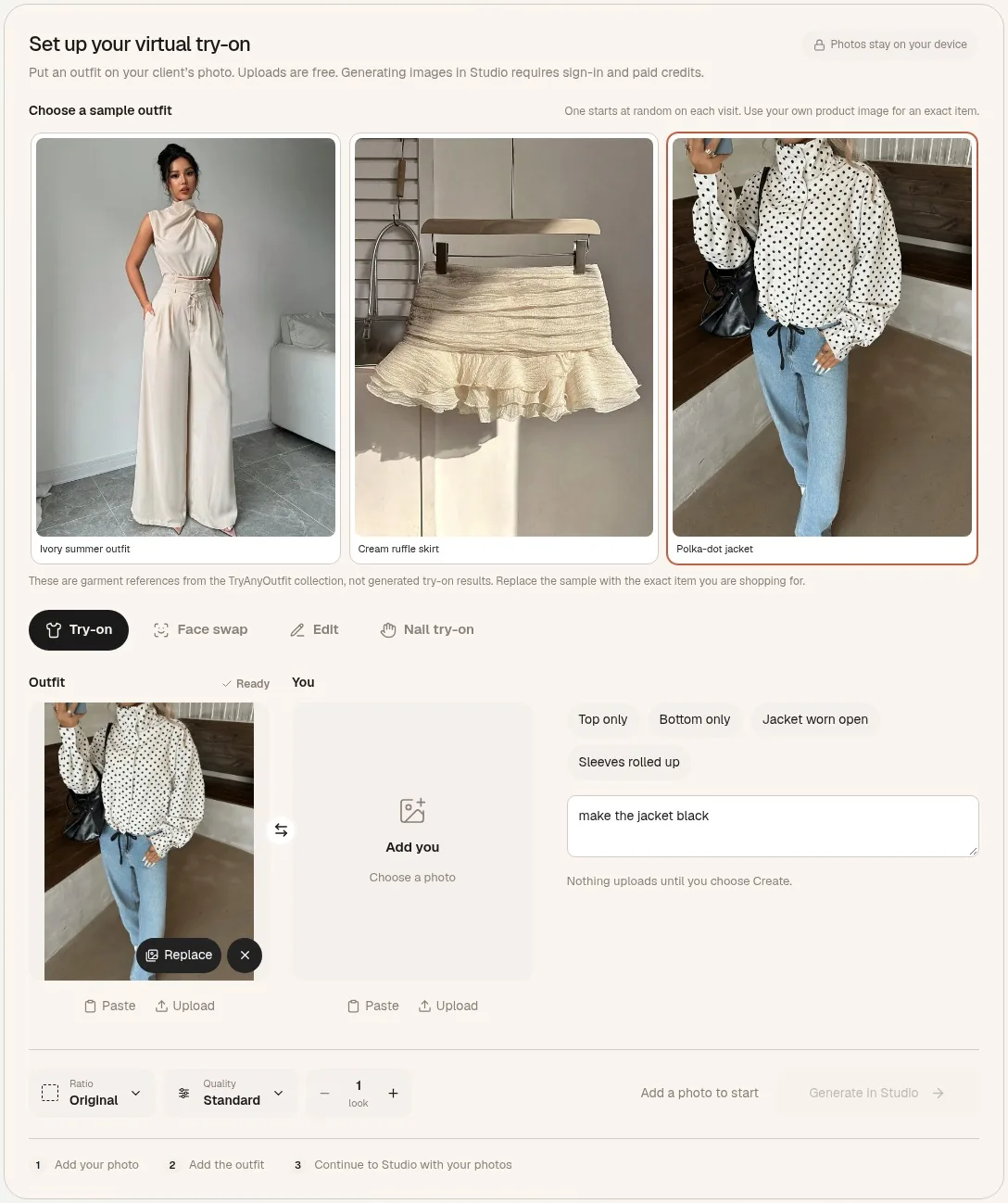 The setup on tryanyoutfit.com with one of the site's sample jackets in the Outfit box and a colour note typed in. Nothing here is a generated result. Screenshot taken October 31, 2026.
Setting all that up is free. Generate in Studio carries both pictures into the Studio editor, and that's where you sign in and spend paid credits, one per image. I'd bought credits in the TryAnyOutfit app on my phone a while back, and the same account works in the browser. There's no free trial, though it's cheap to start; plans are on the pricing page.
The black one I couldn't see
First preview: the midnight blue, open, over my own shirt. Same hallway, same slightly crooked belt. The blue was darker than I expected next to the white collar, which I liked. It read as dressed up without trying too hard.
For the black I had nothing usable to upload. So I ran the same photo with the same blue blazer screenshot and typed a note in the box under the chips: "make the blazer black." The result came back as a black velvet jacket on me, open, same cut.
I want to be clear about what that second picture was. It was the AI's idea of the blazer in black, built from a blue photo. The shop's black might have a different sheen, and the page itself warns that AI can change prints, seams and proportions. So I used the pair to compare one thing, dark blue against black next to my face and a white collar.
Blue won. In the black one I looked like I was working the party. I sent both to my sister without saying which was which, and she picked the blue in about four seconds.
What a picture can't tell you about velvet
The try-on page says this itself: it makes a new image, it doesn't measure you, and it can't show how fabric stretches, feels or fits. With a blazer that matters more than with most things, because shoulders are the part you can't fix cheaply.
So I got my old black wool blazer out of the wardrobe, laid it flat and measured it. Shoulder seam to shoulder seam, then sleeve length from the shoulder to the cuff. I compared both numbers with the shop's size chart instead of trusting the letter on my usual label. The chart put me in the size I normally wear for shoulders, with sleeves about a centimetre longer than my old one.
 Measuring the old blazer against the chart. This settled the size, not the preview.
Velvet has its own problems that no preview shows. The pile crushes where you sit and lean, and it shows marks. Under warm lights it looks lighter in some places than others. I read the care label on the listing (dry clean only) and the returns page. I ordered in mid-November so there was time to send it back and still find something else if it was wrong. Holiday orders can have different return windows, so I checked the date on mine before paying.
On privacy: I'd uploaded a full-length photo of myself. The try-on page says your photos stay on your device and nothing uploads until you choose Create. TryAnyOutfit also says uploaded photos are auto-deleted after 72 hours unless you save them. I saved the blue one to send to my sister and let the black one go.
The night itself
The blazer arrived a week later. The blue was a touch brighter in daylight than in the preview and darker indoors, which is how velvet goes. Shoulders were right. The sleeves were the extra centimetre the chart had warned me about, and with the shirt cuff showing it looked fine, so I left them.
At Tom's, I spent two hours on a sofa, and the velvet on the back and elbows got that crushed, shiny look. A few minutes in the steam from the shower the next day sorted most of it. At midnight we all crowded at the window, and in the photos the blue reads as blue, not as a black hole in the middle of the group.
One honest note: this story is illustrative. Tom, the party and the blazer are made up. The steps are the real ones on tryanyoutfit.com today, and we make the tool, so read it with that in mind. If you're stuck between two colours for a New Year's Eve outfit, take one full-length photo in the clothes you already own and try the new piece over it on the virtual try-on page or in the TryAnyOutfit app on iPhone or Android. A note like "make the blazer black" helps when the shop has no good photo of a colour, as long as you treat that result as a rough guess. The preview can't tell you your size, how velvet wears or whether it will crush, so measure a jacket you own, read the care label and check the return date. Our guide to trying on clothes for events covers dress codes from weddings to work dinners, and the photo guide for virtual try-on explains what makes a good source photo. Earlier stories in this series: How I Try My Bikinis Virtually, How I Picked a Wedding Guest Dress Without Ordering Three, How I Tried a Burgundy Leather Jacket Before Buying It, How I Chose My Job Interview Outfit on One Photo, How I Picked My Holiday Party Outfit Virtually, How I Tried On My Thanksgiving Outfit From a Screenshot, How I Tried On a Thrifted Wool Coat Before Buying It, How I Picked My First Date Outfit From My Own Closet, How I Tried On My Halloween Costume Before Ordering It, How I Picked My Outfit for Our Fall Family Photos, How I Tried On a Leopard Skirt Before a Comedy Show, How I Tried On My Concert Outfit Before Buying the Jacket and How I Planned My Vacation Outfits Before Packing.
Frequently asked questions
Can I see a New Year's Eve blazer over clothes I already own?
Yes. Take a full-length photo in the shirt and trousers you plan to wear, add the blazer's product photo or a screenshot in the Outfit box on tryanyoutfit.com/tryon, and tap Jacket worn open if you'll wear it open. Then choose Generate in Studio.
Can I try a colour the shop has no good photo of?
You can type a note such as "make the blazer black" in the instructions field. Treat that result as the AI's guess at the colour, not the shop's real version, and check the colour swatch and reviews before ordering.
Does generating cost anything?
Photo setup on the try-on page is free. Generating needs sign-in and paid credits, one per image, shared across the web Studio and the iPhone and Android apps. There's no free trial, but it's cheap to start; current plans are at tryanyoutfit.com/#pricing.
Will the preview show my blazer size?
No. Virtual try-on creates a new image; it doesn't measure your body or show how fabric stretches, feels or fits. Measure the shoulders and sleeves of a jacket you own, compare them with the size chart, and check the return window before December 31.
Will velvet look the same as in the preview?
Not exactly. Velvet changes with light and crushes where you sit or lean, and AI can change prints, seams and proportions. Keep the shop's product photo open next to each result.
What happens to my photos?
The try-on page keeps your chosen photos on your device until you choose Create, and TryAnyOutfit auto-deletes uploaded photos after 72 hours unless you save them.