


Short answer: I tried an olive chore jacket over a cream sweater I already owned, using one full-length photo and TryAnyOutfit's virtual try-on. Once I saw it worn open with the sleeves rolled, I knew it matched my sister's palette for our fall family photos. Fit was a different question, and only the size chart and the real jacket could answer it.

An olive jacket, a cream sweater and one Sunday photo session.
My sister booked the photographer in September. Sunday at four, a park twenty minutes from my parents' house, all eleven of us. Two weeks before, she sent the group chat a picture of three paint swatches and one line: olive, cream, denim. Nobody wear black.
I opened my closet. I own a lot of navy and a lot of black. In the right column, so to speak, I had a cream cable-knit sweater from a few winters ago and a pair of dark jeans. That's not nothing, but on its own it felt plain next to my brother-in-law, who had already posted a photo of his new olive overshirt in the chat.
I had also found an olive cotton chore jacket in an online shop. It was in my cart. The question I couldn't answer from the product page was whether it would look right over the cream sweater on me, or whether I'd look like I was wearing my brother-in-law's jacket.
 The kind of park my sister had in mind: trees, a blanket, late light.
One photo of me in the sweater
I'd seen the virtual try-on page on tryanyoutfit.com. You add a photo of yourself in the You box and a picture of the clothes in the Outfit box. The page says the clothes can be a product image, a shopping screenshot or a photo of clothes you own.
The page also says a face-only selfie isn't enough for a full outfit, so I put on the cream sweater and the dark jeans and propped my phone on the bookshelf. I set the timer and took a full-length photo by the window, facing the camera, arms a little away from my sides. No filter. That one photo was going to be the base for everything, so I took it twice and kept the sharper one.
For the jacket, I saved the shop's product photo, the one with the jacket on its own against a white background, and cropped out the size buttons and the price. The page asks for that too: show the whole garment and crop out shopping buttons and anything unrelated.
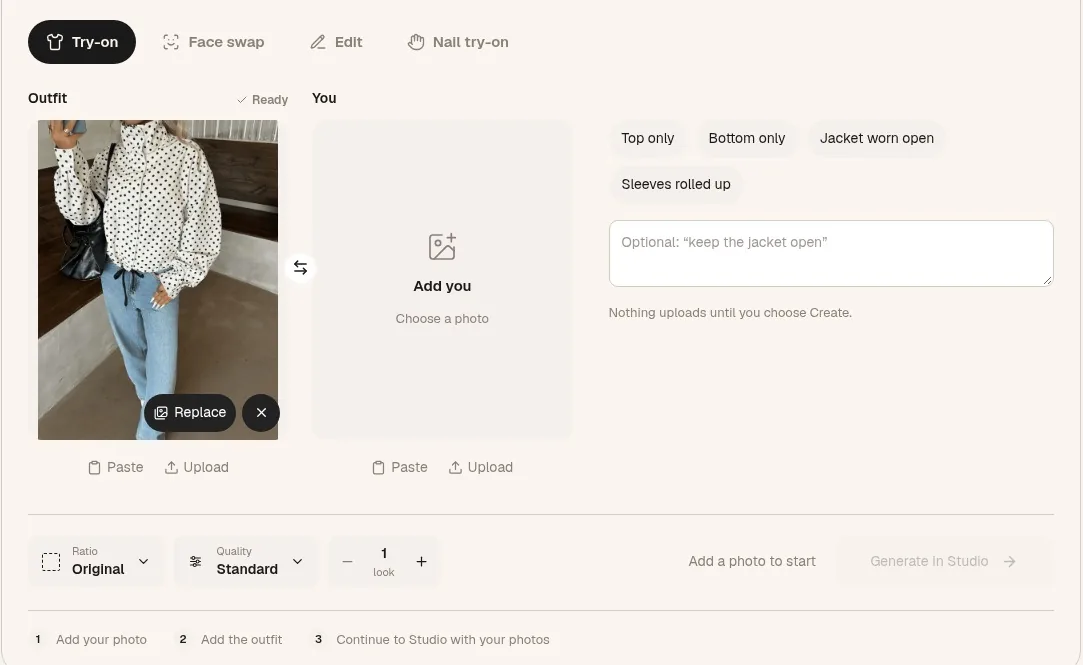 The setup on tryanyoutfit.com before adding anything. The polka-dot outfit is one of the site's samples. Screenshot taken October 29, 2026.
Under the two boxes there's a row of chips. I tapped Jacket worn open, because a chore jacket buttoned to the neck would hide the sweater, and the sweater was the cream in olive, cream, denim.
Picking the photos and settings costs nothing. Generating doesn't: Generate in Studio carries both images into the Studio editor, where you sign in and spend paid credits, one per image. I already had credits from the TryAnyOutfit app on my phone, and the same credits work in the web Studio. There's no free trial, but it's cheap to start, and the plans are on the pricing page.
Three credits
The first preview put the olive jacket over my sweater, open at the front, with the jeans left alone. It looked like an outfit somebody had thought about, which was the point. The olive sat between the cream and the denim instead of fighting either one.
I did a second one with the same photo and the same jacket, adding the Sleeves rolled up chip. I had a feeling the sleeves would be long on me, and I wanted to know if rolling them would look deliberate or sloppy. Rolled twice, it looked fine. Maybe better, because a bit of the cream knit showed at the cuffs.
The third credit went on a test I almost skipped. I ran the jacket against the photo without the chip, to see it buttoned. Buttoned, the jacket swallowed the sweater, and from the waist up I was one olive block. Open it was, then.
The try-on page is plain about what these images are. AI can change prints, seams and proportions, it says, so an attractive preview isn't necessarily an accurate one. I kept the shop's photo next to each result. The preview made the jacket's olive a little warmer than the product photo, and the pockets were in slightly different places. Neither mattered for what I was deciding, which was whether this colour, layered this way, belonged in a photo with my family.
 The combination I wanted to see on me before I paid for the jacket.
What the preview couldn't decide
The try-on doesn't measure you. The page says it creates a new image and doesn't tell you how fabric stretches, feels or fits, and that you should check the retailer's size chart, the garment measurements and the return policy before ordering. So I did all three. My shoulders put me in a medium. The listed sleeve length on the medium was longer than my favourite jacket's by a couple of centimetres, which matched my hunch. The shop took returns within thirty days, and the delivery estimate was five days, which left room before Sunday.
I ordered it. It arrived on Wednesday. The sleeves were long, as the size chart said. The cotton was stiffer than it looked in either the shop photo or the preview, and it creased at the elbows the first time I bent my arms. I washed it once to soften it, which the care label allowed, and rolled the sleeves twice, the way the preview had shown.
A privacy note, since I'd uploaded a full-length photo of myself: the try-on page says the photos you pick stay in your browser until you choose to continue to Studio, and uploads happen there. TryAnyOutfit says uploaded photos are auto-deleted after 72 hours unless you save them. I saved the jacket preview and sent it to my sister, who replied with a thumbs up and "finally, someone in olive who isn't Mark."
 Saturday night: jacket on the door, sweater and jeans on the chair.
Sunday at four
The photographer had us sit on a blanket for half the shots. Seated, the jacket bunched at the waist, so I took it off for those and the cream sweater carried them alone. For the standing shots under the trees it went back on, open, sleeves rolled. My nephew wore a dinosaur T-shirt under his cream sweater and showed it to the camera every time it clicked. Nobody minded.
One honest note: the "I" in this story is an illustrative person. The family, the park and the jacket are made up. The steps are the real ones on tryanyoutfit.com today, and we make the tool, so read it with that in mind. If someone in your family has sent the colours and you're unsure about one piece, put on what you already own, take one full-length photo, and try the new piece over it on the virtual try-on page or in the TryAnyOutfit app on iPhone or Android. A preview can tell you whether a colour and a layer work on you. It won't tell you your size, how stiff the fabric is or whether it arrives in time, so check the size chart, the return policy and the delivery date before you order. For palettes, our fall family photo outfit ideas has six combinations that work together, and the photo guide for virtual try-on covers the base photo. The earlier stories in this series: How I Try My Bikinis Virtually, How I Picked a Wedding Guest Dress Without Ordering Three, How I Tried a Burgundy Leather Jacket Before Buying It, How I Chose My Job Interview Outfit on One Photo, How I Picked My Holiday Party Outfit Virtually, How I Tried On My Thanksgiving Outfit From a Screenshot, How I Tried On a Thrifted Wool Coat Before Buying It, How I Picked My First Date Outfit From My Own Closet and How I Tried On My Halloween Costume Before Ordering It.
Frequently asked questions
Can I try on an outfit for family photos before I buy it?
Yes. On tryanyoutfit.com/tryon, add a full-length or waist-up photo of yourself in the You box and a product photo, shopping screenshot or photo of your own clothes in the Outfit box, then choose Generate in Studio. Generating needs sign-in and paid credits, one per image.
Can I try a jacket over clothes I already own?
Yes. Take the base photo wearing the clothes you plan to keep, then add the jacket as the outfit reference. Chips such as Jacket worn open and Sleeves rolled up let you ask for a specific way of wearing it.
How do I check if a piece fits our family photo colours?
Use the same photo of yourself for every option so only the new piece changes, and keep the shop photo next to each result. AI can shift colours, seams and proportions slightly, so use the preview to judge the colour and layering, not exact details.
Will the preview tell me what size to order?
No. Virtual try-on creates a new image; it doesn't measure your body or show how fabric stretches, feels or fits. Check the retailer's size chart, garment measurements, return policy and delivery date before ordering.
How much does it cost?
Photo setup on the try-on page is free. Generating uses paid credits shared across the web Studio and the iPhone and Android apps. There's no free trial, but it's cheap to start; current plans are at tryanyoutfit.com/#pricing.