


Short answer: for a first date, I photographed a green silk shirt from my own closet flat on my bed and put it on a full-length photo of me with TryAnyOutfit's virtual try-on, next to a new black top I had in my cart. The preview settled the color and the overall look. A twenty-minute sitting test in the real shirt settled the rest.

The green silk shirt from my closet and the black top I nearly bought.
The date was Friday at seven, at a small wine bar two stops from my apartment. We'd been messaging for two weeks. By Wednesday night I had a black square-neck knit top in my cart, and the delivery estimate said Friday "by 8 pm."
That's an hour after the date starts. I noticed it and kept the tab open anyway.
 Friday, seven o'clock. Two bar chairs and a lot of sitting.
I already own three black tops that look a lot like that one. What I also own is a dark green silk shirt I bought in the spring for a wedding that got postponed. It has never left the closet. Every time I take it out I decide it's too much, that it looks like I'm trying too hard, and I put it back. So the real question wasn't which new thing to buy. It was whether the shirt I already had was the right call, or whether I'd feel overdressed in it at a bar with candles in jars.
Photographing my own shirt as the reference
On the virtual try-on page, the Outfit box takes a product image, a shopping screenshot or a photo of clothes you own. I hadn't thought of using it on something already hanging in my closet. But that was the piece I couldn't picture on myself.
I buttoned the shirt, laid it flat on my bed in daylight and straightened the sleeves so both cuffs showed. Then I stood on a chair and took the photo from straight above. The page asks for the whole garment, with unrelated things cropped out, so I cropped off the pillow at the top.
 My reference photo: the whole shirt, collar to hem, with nothing on top of it.
For the You box I propped my phone on a bookshelf, set the timer and took a full-length photo in the hallway. Facing the camera, arms a little away from my sides, in the dark jeans and brown ankle boots I'd wear on Friday and a plain white T-shirt. I skipped the mirror selfie on purpose. The page warns against objects covering the clothing, and in a mirror selfie my phone covers half my chest.
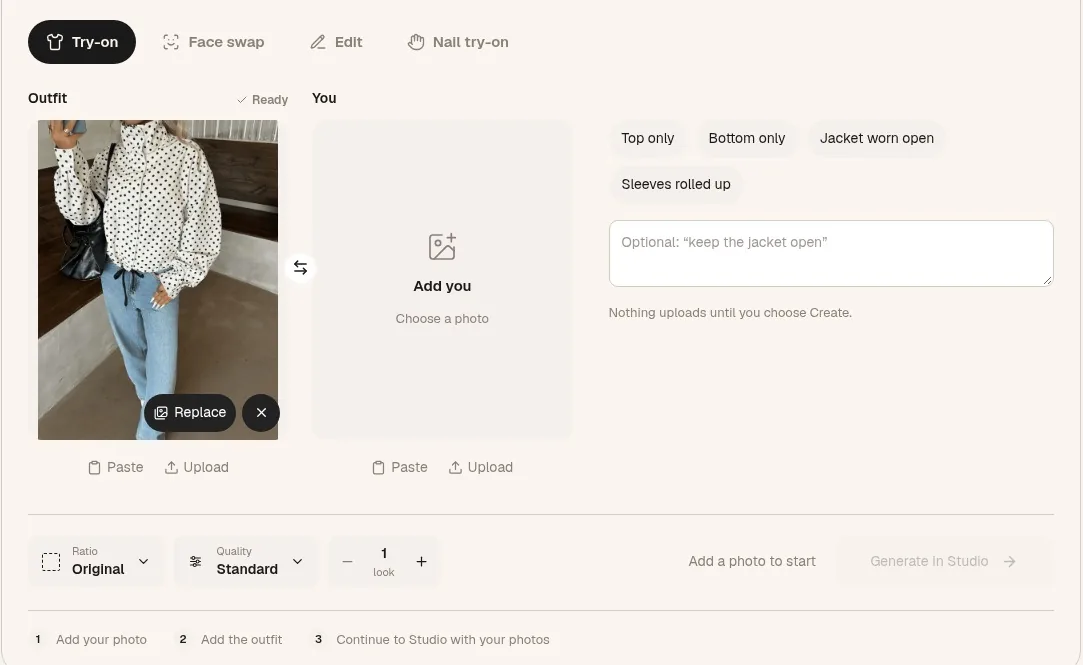 The setup on tryanyoutfit.com before adding anything. The polka-dot outfit is one of the site's samples. Screenshot taken October 29, 2026.
I didn't use any of the chips. In the note box I typed: "shirt tucked into my jeans, top two buttons open." That's how I'd actually wear it, and an untucked silk shirt over jeans is a different outfit.
Until you choose Create, nothing uploads. Both photos stayed in my browser while I set this up.
One credit for the shirt, one for the new top
Generate in Studio carried both photos into Studio, where I signed in. Each image costs one paid credit. There's no free trial, but it's cheap to start; the current options are on the pricing page. The TryAnyOutfit app on my phone shares the same account and credits, though I did this one on my laptop.
For the second credit I saved the product photo of the black knit top and cropped out the "Add to bag" button and the price. Back on the try-on page I used Replace on the Outfit box, kept the same photo of me, and cut the note down to "tucked into my jeans."
Side by side, the black top looked like every Friday I've had this year: fine, and forgettable by Saturday. The green shirt looked like I'd made an effort, and seeing it on my own body instead of on a hanger, I decided I didn't mind that at all. It was a first date. Making an effort is sort of the point.
I did keep the shirt photo next to the result while I looked. The preview made the silk look smoother and a bit shinier than the real fabric, and the collar points came out slightly shorter. The page says AI can change prints, seams and proportions, so I used the preview for one thing only: how that green looks next to my face and with those jeans. For anything about the fabric, I had the real shirt in my hands.
What only the real shirt could tell me
This is the part where owning the shirt helped. A preview can't tell you how a fabric creases or whether buttons pull when you sit down. I could just go and find out.
On Thursday evening I put the whole outfit on and sat on a kitchen chair for twenty minutes with my laptop, roughly the length of a first drink. Three things showed up. The silk creased at the elbows and across the lap. The tuck worked loose on one side when I leaned forward. And the gap between the second and third buttons opened when I sat with my shoulders forward, which is how I sit when I'm listening to someone.
 Thursday night, after the chair test.
None of these meant the shirt was wrong. Each just needed a small fix. I steamed the creases out by hanging the shirt in the bathroom during a hot shower. A small piece of double-sided fabric tape between the two buttons stopped the gap. For the tuck, I wore a belt, which I would never have thought of from the preview.
The black top got a fairer hearing than it sounds. If I'd wanted it, the preview couldn't have given me a size or told me how the knit felt, so I would have checked the size chart and the garment measurements and read the return policy first. But it was going to arrive an hour after the date started. I took it out of the cart.
Before uploading a full-length photo of myself, I also read the privacy policy. It says uploaded photos are auto-deleted after 72 hours unless you save them.
Friday
It was cold enough for a jacket, which came off inside. The shirt held up through two glasses of wine and a walk afterwards. I stopped thinking about it after the first ten minutes, which is about all I want from a first date outfit.
One honest note: the "I" in this story is an illustrative person. The date, the wine bar and the shirt are made up. The steps are the real ones on tryanyoutfit.com today, and we make the tool, so read it with that in mind. If you have something in your closet you keep putting back, you can photograph it flat and put it on your own photo on the virtual try-on page, or in the TryAnyOutfit app on iPhone or Android. A preview helps with color and the overall look. It won't tell you the size, how a fabric creases, or whether a shop's top arrives in time, so test the real clothes when you can. Our photo guide for virtual try-on covers how to take a good photo of yourself, and the guide to trying on outfits for events and what to wear to a comedy show have more date-night ideas. The earlier stories in this series: How I Try My Bikinis Virtually, How I Picked a Wedding Guest Dress Without Ordering Three, How I Tried a Burgundy Leather Jacket Before Buying It, How I Chose My Job Interview Outfit on One Photo, How I Picked My Holiday Party Outfit Virtually, How I Tried On My Thanksgiving Outfit From a Screenshot and How I Tried On a Thrifted Wool Coat Before Buying It.
Frequently asked questions
Can I virtually try on clothes I already own?
Yes. On tryanyoutfit.com/tryon the Outfit box accepts a product image, a shopping screenshot or a photo of clothes you own. Lay the piece flat in daylight, show the whole garment from collar to hem, crop out anything else, and add a full-length photo of yourself in the You box.
How do I compare a first date outfit I own with one I might buy?
Use the same photo of yourself for both. Generate one preview with a photo of your own piece and one with the shop's product photo (crop out the buttons and price), then look at them side by side with each garment reference next to its result.
Will the preview show how a silk shirt creases or whether buttons gape when I sit?
No. Virtual try-on creates a new image; it doesn't show how fabric creases, stretches or feels, and AI can change seams and proportions. If you own the piece, wear it and sit down for a while to check creases, gaps and the tuck.
Does virtual try-on tell me what size to buy?
No. It's a visual preview, not a size recommendation. For a new piece, check the retailer's size chart, garment measurements and return policy, and make sure delivery arrives before the date.
Is TryAnyOutfit free to use?
Adding photos and choosing settings is free. Generating a preview in Studio needs sign-in and paid credits, one credit per image. There's no free trial, but it's cheap to start. Current options are on the pricing page at tryanyoutfit.com/#pricing.