


Short answer: before buying a burgundy leather jacket, I put it and the black version of the same jacket on one waist-up photo of me with TryAnyOutfit's virtual try-on, using the Jacket worn open option, and compared the color next to my face. The preview settled the color. Garment measurements and the shop's return policy settled the size.

A new color on the hook, the old one folded underneath.
I've worn the same black leather jacket for eleven years. It hangs by the front door, the elbows have gone soft and grey, and I put it on without thinking. That's the whole appeal.
So when a burgundy version of almost the same cut turned up in a shop's autumn line, I stood in the hallway with my phone for longer than I'd like to admit. Deep wine red, silver zips, a belt at the hem. Would I actually wear red that close to my face?
 The old jacket on its hook, and the new one on my phone.
My usual way of answering that question is expensive in a slow way. Order it, try it on in the bathroom mirror with the tags tucked in, decide I'm not sure, print a return label, queue at the post office. I've done that loop with a mustard coat and an olive bomber, and both went back.
The shop photos weren't going to settle it. The model has dark hair and olive skin. My skin goes pink in the cold. Burgundy could look rich on me or make me look like I'd just run for a bus.
Setting up the comparison
This time I opened the virtual try-on page on my laptop before adding anything to the basket. The setup is two boxes: Outfit on the left, You on the right, each with Paste and Upload under it.
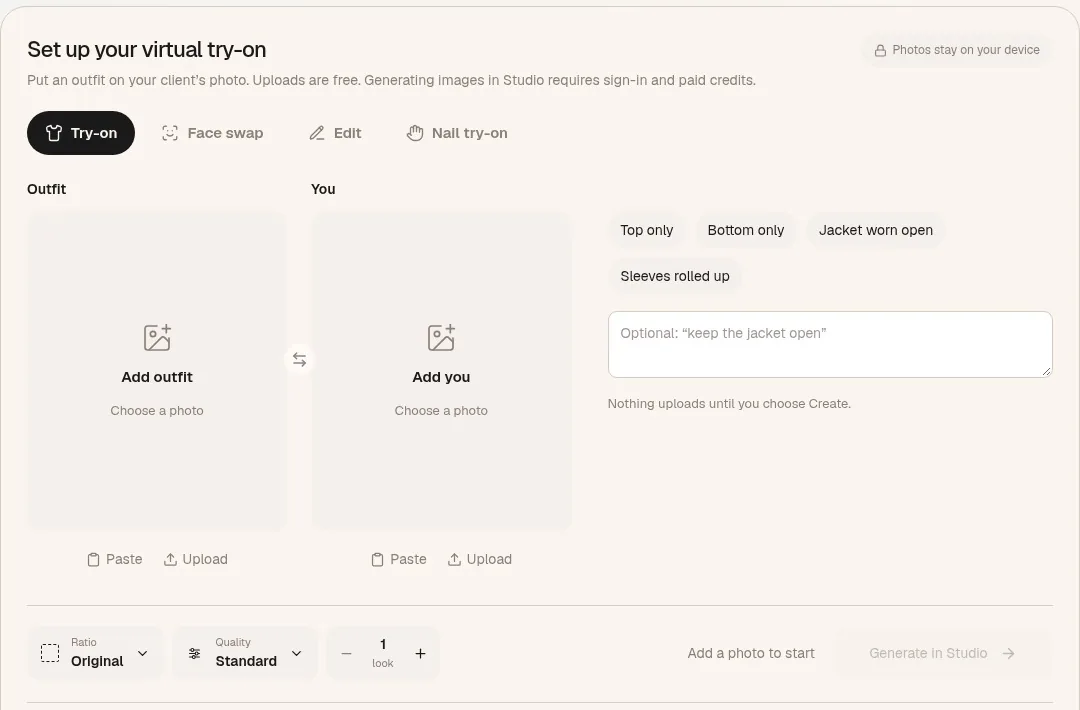 The setup on tryanyoutfit.com before anything is added. Screenshot taken October 27, 2026.
For the outfit I used the shop's front product shot of the burgundy jacket, cropped tight around the jacket with the size buttons cut off. Half a sleeve gives the AI nothing to work with.
For me, I didn't need my feet in the picture. The page asks for a photo facing the camera, full body or waist up, arms away from the sides, and for a jacket waist up is plenty. I wore what I'd actually put under it: a cream cable-knit jumper and jeans. Daylight from the living room window, phone on a stack of books, self-timer, five tries, one keeper.
Then the part I liked. Next to the photos there's a row of chips: Top only, Bottom only, Jacket worn open, Sleeves rolled up. I never zip a leather jacket, so I tapped Jacket worn open. There's also an optional note box, and its grey hint text literally says "keep the jacket open", which made me laugh. I left the note empty because the chip already said it.
A line under the box says nothing uploads until you choose Create. Up to that point it's two pictures sitting in my browser.
Two credits, same photo
I pressed Generate in Studio. Studio opened with my photos already loaded, and that's where I had to sign in. Each generated image uses one paid credit. I wanted two looks, burgundy and then the black version of the same jacket from the same shop, so the comparison cost two credits. Current options are on the pricing page.
Running the black one too was the point. I wasn't really asking "does burgundy look nice". I was asking whether it looked better on me than the color I already trust. That needs the same photo, the same pose and the same light for both, or I'm comparing two photos of myself.
What I looked at
The color near my face, first. In the burgundy preview my cheeks didn't turn into a second red, which was my real fear. It read as dark wine against the cream jumper, closer to brown than to fire-engine red. The black one looked like me on any Tuesday.
Then I checked the preview against the shop photo, piece by piece: two chest zips, the belt at the hem, collar snaps in place. AI can quietly redraw small things like a zip or a pocket flap. When a detail changes, I stop trusting the preview on that detail, because it's now showing a slightly different jacket.
One more thing I kept in mind: the color in any preview is only as true as the product photo it came from, and that photo looked a shade brighter on my phone than on my laptop. So I treated it as "dark red, warm side" and not as an exact swatch.
What a picture can't tell me
Plenty, with a leather jacket. Whether the shoulders sit where mine end. Whether the sleeves still reach my wrists when I'm holding a steering wheel. How stiff the leather is in week one, how heavy it feels on a long walk. Whether it's the kind of leather that softens or the kind that cracks. A preview is a new image of me, not a fitting, and it doesn't measure anything.
 Measuring flat is the boring step that actually picks the size.
So the size went back to the shop's numbers. I laid my old black jacket flat and measured it seam to seam across the shoulders and from shoulder seam to cuff. Then I compared those against the garment measurements on the product page, not just the S/M/L chart. And I read the returns page before paying, because some shops treat sale items as final sale, and I wasn't going to find that out after the parcel arrived.
What I ordered
The burgundy one. I went with the size whose shoulder measurement came closest to my old jacket, which wasn't the size I'd have clicked on instinct. First red outerwear of my adult life. Still a little surprised.
 The outfit I had in mind, laid out on the bed.
The preview answered the question the model photo couldn't, which was how this red looks next to my face. The tape measure and the returns page answered the rest. The black jacket is staying by the door.
One honest note: the "I" in this story is an illustrative shopper, and the eleven-year-old jacket is made up. The steps are the real ones on tryanyoutfit.com today, and we make the tool, so read it with that in mind. If you're stuck between a new color and the one you always buy, you can set up the same two-look comparison on the virtual try-on page in your browser, or in the TryAnyOutfit app on iPhone or Android, which shares the same account and credits. For layering a jacket over a whole outfit, there's our guide to trying on the full look, and if your starting point is a shop screenshot, see trying on clothes from a store screenshot. The other stories in this series are How I Try My Bikinis Virtually and How I Picked a Wedding Guest Dress Without Ordering Three.
Frequently asked questions
Can I try on a jacket in a different color virtually before buying it?
Yes. On tryanyoutfit.com/tryon you add a photo of the jacket and a photo of yourself, then open both in Studio to generate a preview. Run each color on the same photo of you so you're comparing the jackets, not two different photos.
How do I keep the jacket open in a virtual try-on?
On the TryAnyOutfit setup there's a Jacket worn open chip next to your photos, and an optional note box for extra instructions. Pick the chip before you choose Generate in Studio.
What photo of me works best for trying on a jacket?
A waist-up or full-body photo facing the camera in even light, arms away from your sides, wearing what you'd put under the jacket. For the jacket, use a product photo that shows the whole garment, with shop buttons cropped out.
Will a virtual try-on tell me my jacket size?
No. The preview is a new image, not a measurement. Measure a jacket that fits you flat (shoulder seam to seam, shoulder to cuff), compare that with the shop's garment measurements, and check the return policy, especially on sale items.
Is TryAnyOutfit free to use?
Adding photos and choosing settings is free. Generating a preview in Studio needs sign-in and paid credits, one credit per image. Current options are on the pricing page at tryanyoutfit.com/#pricing.