


Short answer: before ordering a wedding guest dress, I put both versions I was torn between on the same full-length photo of me with TryAnyOutfit's virtual try-on, then compared color, neckline and hem. The preview settles how a dress looks on my body. The brand's size chart, the garment length and the return window decide the size and the timing.

Two versions of one dress, and only one of them was going in the basket.
For two weeks the invitation has been on the fridge. Late October, ceremony in an orchard, dinner after in a converted barn. The card says "cocktail attire." I'm bad at dress codes, and this one isn't helping. What am I supposed to do with my arms when it gets cold at six?
It's a Tuesday night and I've narrowed it to one shop and one color. Sage green satin, midi length. Two versions: a slip dress with thin straps, and a long-sleeved one with a wrap skirt.
 Tuesday night, two tabs, one invitation.
Here's the old me's plan: order both, plus the slip dress one size up in case. Three dresses, one parcel, two trips to the post office. I've done it before, and I still remember the refund that took nineteen days.
The model photos don't help much. She's tall, she's standing in perfect light, and both dresses look great on her. I don't need to know if they look good. I need to know which one looks like me at a wedding.
Same photo, two dresses
So before ordering anything, I open the virtual try-on page on my laptop. It's two boxes side by side. The left one says Outfit, the right one says You, and each has Paste and Upload under it.
 The setup screen on tryanyoutfit.com before anything is added. Screenshot taken October 27, 2026.
The dress photo is the easy half. I screenshot the slip dress from the product page, then crop it so the whole dress shows from straps to hem, with no "add to bag" button and no row of other suggestions. A dress cut off at the knee gives the AI nothing to go on for where the hem lands.
My photo is the fussier half. A dress replaces everything from my shoulders down, so a selfie is useless here. The page asks for someone facing the camera, full body or waist up, arms away from the sides. For a midi I go full body. I stand by the hallway wall in daylight, in a fitted T-shirt and leggings, phone propped on the shoe rack with a timer. I take four and keep the one where my feet are in the frame.
The chips on the right (Top only, Bottom only, Jacket worn open, Sleeves rolled up) are for separates, so I leave them off. There's also an optional note box. I leave that empty too. The line under it says nothing uploads until I choose Create, so up to this point it's just my browser holding two pictures.
Where it costs something
Then I press Generate in Studio. Studio opens with both photos already in it, and this is where I have to sign in. Each generated image uses one paid credit, so the comparison costs me two credits, one per dress. The current options are on the pricing page.
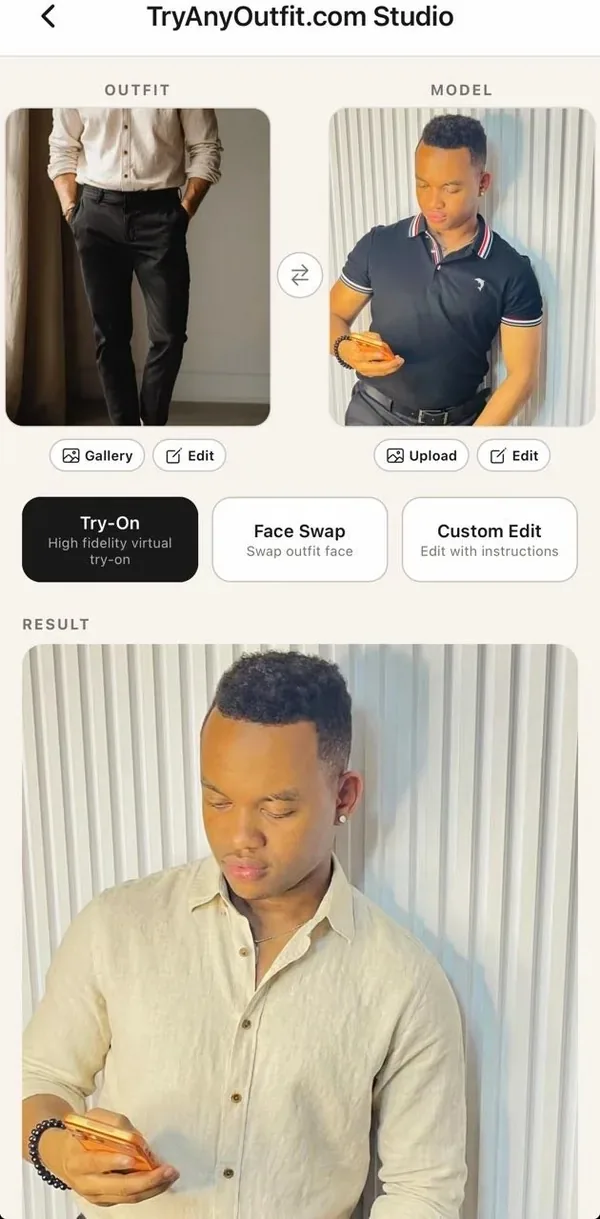 How Studio lays it out: the outfit and your photo on top, the result underneath. This is the app's own demo with a shirt, not one of my dresses.
The rule I keep is the same photo for both dresses. Same hallway, same pose, same light. Otherwise I'd be choosing between two photos of myself and calling it a choice between dresses.
I run the slip dress first, then swap in the long-sleeved one.
What I actually looked at
Color first. Sage can go grey on me, which is exactly the thing a model photo can't answer. Then the neckline against my shoulders, and where the hem sits relative to my knees and ankles. Midi on a tall model and midi on me are not the same length.
Then I go detail-hunting. I put each result next to the shop's photo and check that the straps are still thin, that the wrap still closes on the left and the sleeves stop at the wrist. AI can redraw small things, a seam here, a slit there. If a detail changed, I don't judge that detail from the preview. At that point it's showing me a slightly different dress.
On this night, the slip dress looked lovely and a little too much like a nightie in my hallway light. The long-sleeved one looked like a person going to an orchard wedding in October. That was the decision, really.
What the picture can't tell me
This part matters more than the preview, I think. The image doesn't know my measurements and it doesn't pick a size. It can't tell me whether satin shows every crease after an hour of sitting, how heavy the fabric is, or whether the wrap gapes when I walk. It's a picture of a dress on my photo, not a fitting.
 The tape measure still decides the size.
So the size question goes back to the shop. I take my measurements and read the brand's own size chart, not the letter I usually buy. I check the garment length in the product details against my own measurement from shoulder to mid-calf. And I read the returns page before paying, mostly to work out whether an exchange could still arrive before the wedding.
The one I ordered
One dress. The long-sleeved sage midi in the size the chart gave me, which turned out to be one up from what I'd have guessed. I ordered it with three weeks to spare, so there's room for an exchange if the fit is off.
 One dress, plus a cardigan for the barn.
The preview answered the question I couldn't answer from a model photo, which is how this color and this cut look on my body. The size chart and the return policy answered the rest.
One honest note: the "I" in this story is an illustrative shopper, and this Tuesday night is made up. The steps are the real ones on tryanyoutfit.com today, and we make the tool, so read it with that in mind. If you've got a wedding coming up and two tabs open, you can set up the same comparison on the virtual try-on page in your browser, or in the TryAnyOutfit app on iPhone or Android, which shares the same account and credits. For more on getting a dress to come out right, there's our guide to AI dress changer apps, and for any big occasion there's how to plan an event outfit with virtual try-on. The swimwear version of this story is How I Try My Bikinis Virtually.
Frequently asked questions
Can I try on a wedding guest dress virtually before buying it?
Yes. On tryanyoutfit.com/tryon you add a photo of the dress and a photo of yourself, then open both in Studio to generate a preview. It shows how the color and cut could look on you. It doesn't confirm your size.
What photo works best for trying on a dress?
A full-length photo of you facing the camera in even light, arms away from your sides, in fitted clothes. For the dress, use a product image that shows it from neckline to hem, with shop buttons cropped out.
Does a virtual try-on tell me which dress size to order?
No. The preview is a new image, not a measurement. Use the brand's size chart and garment length, and check the return window so an exchange can arrive before the wedding.
Is TryAnyOutfit free to use?
Adding photos and choosing settings is free. Generating a preview in Studio needs sign-in and paid credits, one credit per image. Current options are on the pricing page at tryanyoutfit.com/#pricing.