


Your photo. Any outfit.
AI clothes changer. Any outfit, on your photo.
Add a photo of you and a picture of the clothes you want. A store screenshot works. An AI clothes changer combines both into a new look on your photo. See it before you order, then change the whole outfit or just the top or bottom.
Photo setup is free. Generating a result requires an account and paid credits.
Set up your outfit change
Choose a photo of yourself and a clothing image. Selecting photos is free; generating in Studio requires sign-in and paid credits.
Photo → outfit → preview
How to change clothes in a photo with AI
Keep the same person photo when you compare outfits. It makes color and styling differences easier to judge.
- 01
Add a clear photo of yourself
Use even light and a simple pose. Show the whole area you want to change; a face-only selfie is not enough for a full outfit.
- 02
Add the clothes you want to try
A product photo, flat lay or store screenshot can work. Make sure the garment is visible rather than hidden behind shopping controls.
- 03
Generate and compare
Open your choices in Studio, sign in and use credits to generate. Compare the preview with the retailer's photo, size chart and return policy.

Preview styling, then check the store listing for size and fabric.
Use your photoThe inputs and the result
An outfit swap you can inspect.
Real examples help you judge what a preview can show, and where you should still trust the original product photo.
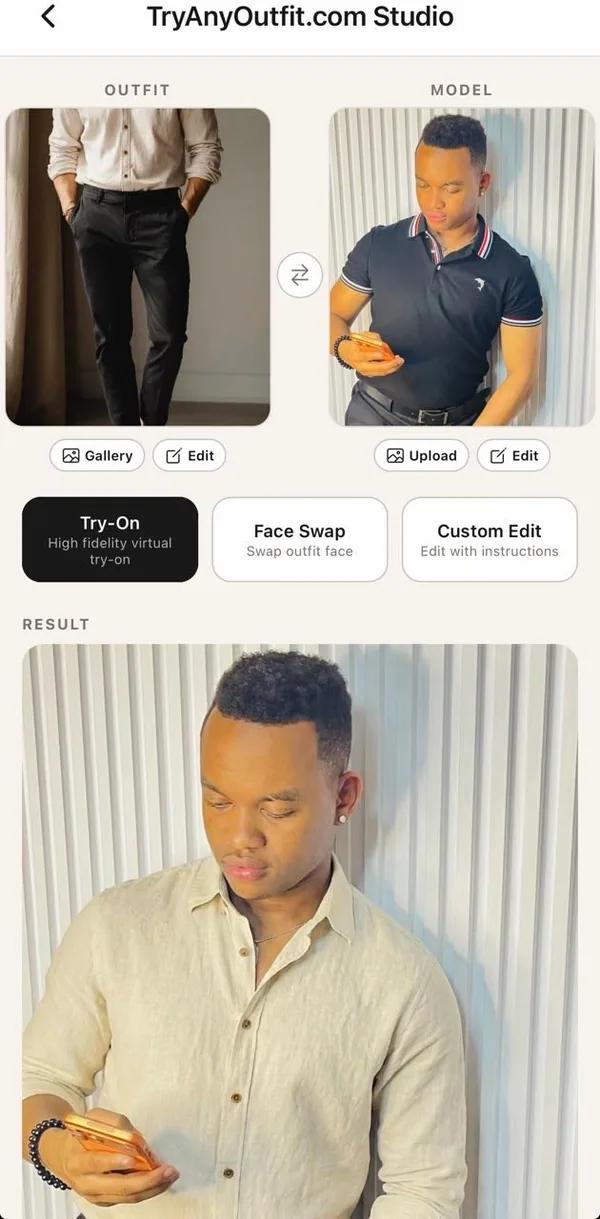
01 / A real workflow
From a screenshot to a decision.
The first image shows the outfit reference next to a photo of a man in a navy polo. The result places a cream shirt on that same person. You can compare the neckline, color and overall styling before you return to the store listing.
The two looks below show how far the direction can change while the person and setting stay recognizable. They also show why a preview is for styling, not for judging the exact fabric, size or seams.


From a single garment to a full look
Change the part you're unsure about.
Try a work blazer, wedding-guest dress, suit, jeans or activewear. Choose Top only or Bottom only in the tool to keep the rest of the outfit from your source photo.
A clothing image can come from a store page, your camera roll or your own wardrobe. For swimwear, use our separate bikini try-on guide with photo tips for that garment.
Make the inputs count
Tips for a realistic outfit swap
Face the camera with your arms slightly away from your sides. A bag, crossed arms or a phone covering your torso gives the AI more to guess. Daylight and a clear garment image usually make the comparison easier.
Before you keep a result, inspect the face and hands, then the sleeves, prints and logos. If the preview disagrees with the product image, trust the product image. Our guide to common outfit-swap mistakes goes into more detail.
What a preview cannot do
A look, not a size recommendation.
A virtual try-on can help you decide whether the color or silhouette appeals to you. It cannot measure your body, tell you how fabric feels or choose a size. Small details and proportions can shift in a generated image.
Keep the original listing open. Check its measurements and returns before ordering, even when the preview looks convincing.
Clear costs, before you create
Is the AI clothes changer free?
The app is free to download. Choosing and uploading your photos is free. Every generated try-on needs an account and paid credits; there are no free generations or free trial.
Use a subscription if you try looks regularly, or a one-time credit pack for a single shopping decision. See current pricing before you buy. Your app and web studio share the same credit balance.
What “free” means across these toolsYour photo is yours
Preview a look without giving up control.
Photos are processed on our cloud servers to create your result. They are not used to train AI models or shared with advertisers. Uploaded photos and generated images are automatically deleted after 72 hours unless you save a look to your wardrobe.
Wardrobe saves remain until you delete them. You can remove your account and photos in the app settings. See the privacy policy for the full details.
Questions people ask first
AI clothes changer FAQ
What is an AI clothes changer?
It takes a photo of a person and a picture of clothing, then generates a new image of that person wearing the clothes. TryAnyOutfit is built for previewing an outfit on your own photo before you buy.
How do I change clothes in a photo with AI?
Add a clear photo of yourself and an image of the clothes above. Continue to Studio, sign in and generate a preview. Compare the result with the retailer's original product photo before deciding.
Is the TryAnyOutfit AI clothes changer free?
The app is free to download, and selecting photos on this page is free. Generating each try-on requires an account and paid credits. There is no free trial or free generation.
Do I need to sign up?
You can select your photos and set up a look without an account. You need to sign in when you generate the result in Studio.
Does it show how the clothes will fit me?
No. The result is a visual preview, not a measurement or size recommendation. Check the retailer's size chart, garment details and return policy before ordering.
Are my photos used to train AI?
No. Photos are processed to create your requested result. TryAnyOutfit does not use them to train AI models or share them with advertisers.
How long do you keep my photos?
Uploaded photos and generated images are automatically deleted after 72 hours unless you save a result to your wardrobe. Wardrobe saves remain until you delete them or your account.
What clothes can I try on?
Use an image of a top, trousers, dress, suit, jacket or full outfit. A product photo, flat lay or store screenshot can work when the garment is clearly visible. You can also choose to change only the top or bottom.
Which devices are supported?
You can use the web studio in a browser or the TryAnyOutfit app on iPhone and Android. The app and web studio share your account and credit balance.
Browser or phone
Take the look with you.
Use TryAnyOutfit on iPhone, Android or the web. The account, credits and looks you save to your wardrobe travel with you.