


Short answer: NoteGPT's clothes changer is a browser tool inside a notes-and-study AI suite, and after two free images a day each result costs 6 of the same credits you'd spend on transcripts and slides. For outfits alone, start with Magic Hour or bitStudio. Kling AI handles several garments at once. To see a look on your own photo on a phone, try FitRoom or TryAnyOutfit.
Most people know NoteGPT for summaries and transcripts. The clothes changer is one tool among dozens on the same account.
Once the free images run out, you'd be paying for a study suite to change outfits. We don't think that's worth it. Full disclosure: we make TryAnyOutfit, a try-on app, so we're on this list too.

NoteGPT starts from a person photo plus clothes. Every tool below does too, in a slightly different way.
What NoteGPT's clothes changer actually does
You upload a person photo, then add clothes in one of two ways. Either drop in up to 8 clothes images, or type a description of the outfit. Files can be PNG, JPG or WebP up to 20MB, and the result downloads as a JPG.
It runs in a phone browser. There's no app for it, though NoteGPT has a Chrome and Edge extension for its other tools.
The free part is where the page argues with itself. The upload box says "2 free image daily, then 6 premium credits / image." Further down, the FAQ says you can download edited images "as many times as you want without spending a cent." We'd trust the counter on the upload box.
Paid credits come from NoteGPT's main plans. Pro is $9.99 a month or $108 a year and includes 100 premium credits a month. Those credits also pay for premium transcription and video. Spent only on outfits, that's 16 images. Unlimited is $29 a month with 2,800 credits, and Max is $99 a month.
On privacy, the FAQ says NoteGPT doesn't store uploads and deletes files right after processing. We couldn't load its privacy policy page to check the details.
We covered what "free" means across these tools in free AI clothes changers, so this list sorts them by what you start with instead.
| Tool | Clothes input | Where it runs | Best for |
|---|---|---|---|
| Magic Hour | One clothing photo; top, bottom or full outfit | Browser | Quick free swaps without an account |
| bitStudio | Flat lay or on-model clothing photo | Browser | Free tries, paid upgrades without watermarks |
| Kling AI | Several reference images, text, or both | Browser, App Store app | Building a look from many pieces |
| Pincel | A garment image on a model photo | Browser | Sellers dressing models for product shots |
| FitRoom | Your own clothes photo or its catalog | Browser, iPhone, Android | Your photo on a phone, with an API for shops |
| TryAnyOutfit | Any outfit image or store screenshot | iPhone, Android, web | Seeing a look on your real photo before you buy |
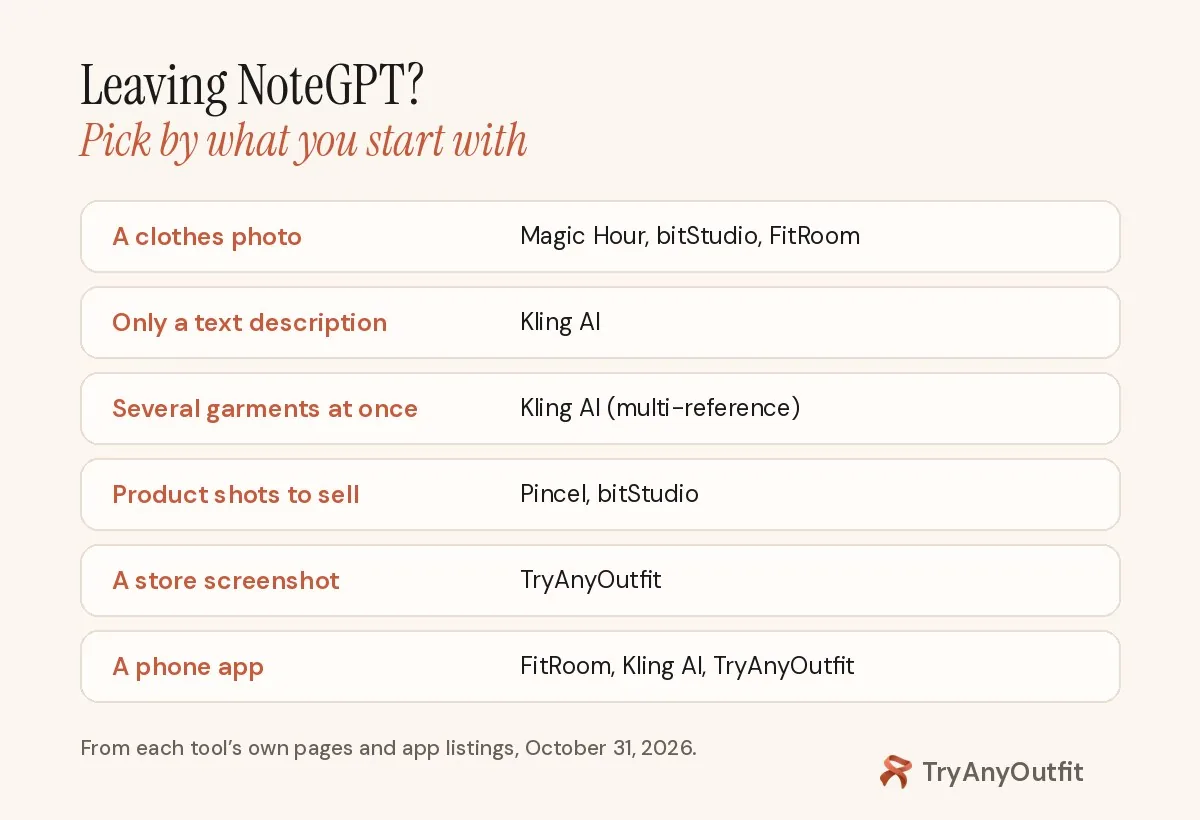
Sorted by what you already have, from a single clothes photo to a store screenshot.
1. Magic Hour: the simplest free swap
Magic Hour works the same way NoteGPT's image mode does, minus the suite. Upload a person photo and a separate clothing photo. Then choose how much to swap, from the top half to the whole outfit.
You get 3 free swaps a day with no sign-up and no watermark. A free account then charges 25 credits per swap, and more credits come with paid plans or packs. Commercial use needs a paid plan. Magic Hour's own page says results don't guarantee real-world fit or color, which is fair for every tool here.
2. bitStudio: if watermarks don't bother you yet
No login needed. bitStudio lets you try it free within daily limits, with a watermark on the result. The clothing image can be a flat lay or a photo of someone wearing it.
On the page, quality comes in a free level plus 1-credit and 2-credit levels. Paying removes the watermark. For shops there's an API too.
3. Kling AI: if one clothing image isn't enough
This is the one to use when NoteGPT's text box feels too loose. Kling's clothes changer takes numbered references: Image 1 is the person, Image 2 the shirt, Image 3 the jacket, and so on through shoes. You can add a text prompt on top, or skip the references and just describe the change.
Output goes up to 2K or 4K, and there's a Kling app on the App Store. Its clothes changer page doesn't list a price, so check your account before a big batch.

A flat, evenly lit clothes photo gives any of these tools a cleaner garment to work with.
4. Pincel: if you're dressing models to sell clothes
Unlike the others, Pincel is built for product photos rather than personal try-on. You upload a model photo and a garment image, and it takes 30 to 50 seconds.
Each image costs 2 credits, and a new account gets 20 free credits with no card. Pincel says you keep full commercial rights to what you make, which is the main reason a seller would pick it over NoteGPT.
5. FitRoom: if you want an app on your phone
Because FitRoom has a website plus iPhone and Android apps, you're not stuck in a browser tab. Upload an outfit image or pick from its catalog, then use your own photo or one of its preset models. It says results take 10 to 15 seconds and that uploads are encrypted and deleted after processing.
The web version says "Start for free." On the US App Store it's rated 4.59 from 257 ratings, and in-app purchases include a $4.99 weekly plan. The Android listing shows ads. We compare it with our app in TryAnyOutfit vs FitRoom.
6. TryAnyOutfit: if you're deciding whether to buy
We built TryAnyOutfit for one moment: you've found an outfit online and want to see it on you. Add a clear photo of yourself and any outfit image, such as a product photo or a screenshot from a shop or TikTok. You get the look on your real photo, not an avatar.
Credits are shared between the phone apps and the web studio. Uploaded photos are auto-deleted after 72 hours unless you save them. There's no free trial, but it's cheap to start; see pricing.
It previews a look. It won't measure fit or pick your size.

The outfit image goes on one side, your photo on the other, and the result shows below.
How to choose
Already using NoteGPT for notes and paying for Pro? Then the clothes changer is a fine extra, as long as you remember outfits eat the same credits. If you came for outfits alone, start with Magic Hour's three free swaps and move to Kling AI when you want to combine several pieces.
Shopping is a different job. With a store screenshot on your phone, an app beats a browser tab, so pick FitRoom or TryAnyOutfit. Our best AI clothes changers guide compares more of them, and how to change clothes with AI covers getting a clean result.
Sources
Checked on October 31, 2026, on each tool's own page and its US App Store and Google Play listings.
Items mentioned
- Magic Hour: Person photo plus clothing photo; 3 free swaps a day with no sign-up and no watermark.
- bitStudio: Free with no login within daily limits and a watermark; paid 1- and 2-credit quality levels and an API.
- Kling AI: Multiple numbered references, text prompts or both, with 2K or 4K output.
- Pincel: Garments on model photos for sellers; 2 credits per image, 20 free credits on sign-up.
- FitRoom: Outfit images on your own photo or a preset model; web, iPhone and Android.
- TryAnyOutfit: Any outfit image or screenshot on your real photo, not an avatar, on iPhone, Android and web. See pricing at https://tryanyoutfit.com/#pricing.
Frequently asked questions
Is NoteGPT's AI clothes changer free?
Only partly. The upload box says 2 free images a day, then 6 premium credits per image. The FAQ on the same page says it's free as many times as you want, so we'd go by the counter (checked October 31, 2026).
How many outfit images does NoteGPT Pro cover?
NoteGPT Pro is $9.99 a month or $108 a year with 100 premium credits a month. At 6 credits per image, that's 16 clothes-change images if you spend the credits on nothing else.
Does NoteGPT have a clothes changer app?
Its FAQ says the tool works in a phone browser, with no app to download. FitRoom and TryAnyOutfit have iPhone and Android apps, and Kling AI is on the App Store.
Can I change clothes from several garment photos at once?
NoteGPT accepts up to 8 clothes images. Kling AI lets you number each reference (person, shirt, jacket, shoes) and add a text prompt on top.