


"Clothes swap AI" sounds like a parlor trick. Upload a person photo, upload a garment photo, and the tool pastes one onto the other. Why does that phrase keep winning searches? Because people want that exact job: another real outfit on a real photo, not a prompt inventing a dress no shop sells.
We make TryAnyOutfit, one of the tools below, and we haven't run a controlled quality test across them, so please don't read the order as a ranking by image quality. Think of it as a field guide to what each swap tool asks for and what it costs. Every term here comes from the tools' own pages.

Clothes swap AI keeps the person and pose and replaces the outfit with another garment photo.
The short version first.
| Tool | How you feed the outfit | Free side (per the site) | Paid side | Built mainly for |
|---|---|---|---|---|
| Pincel Clothes Swap | Model photo + garment image | 20 credits on sign-up, no card. 2 credits per image on the tool page | Plans from $19/month. credit top-ups | Sellers putting products on models |
| Media.io AI Outfit Swap | Photo + prompt (or clothing transfer flow) | Page claims a free version / free unlimited basic outfit swaps | Upgrade for higher resolution and speed | Quick browser swaps and style experiments |
| Vidnoz Clothes Changer | Upload a body photo, pick or upload clothes | Limited free uses per day. login needed to download for free, per FAQ | Credits / upgrade | Casual photo outfit edits |
| TryAnyOutfit | Your photo + store screenshot or social outfit image | Setup is free. rendering uses credits (no free renders) | Packs from $2.99 for 5. plans $7.99/week or $14.99/month | Shoppers trying real product screenshots on themselves |
Most tools in this lane take two images. One is the person. The other is the garment, often a flat lay or a store screenshot. The output keeps the face and pose and rewrites the clothing. For a wider clothes-changer list, see our best AI clothes changers comparison. Mobile-first apps are in the best virtual try-on apps.
Pincel Clothes Swap
Pincel's tool page is built around the two-upload path: a model image and a garment image. Tip on the page: use a garment without a model when you can, cutout or flatlay. Generation is listed at 30–50 seconds, and the on-page meter says 1 image = 2 credits.
New accounts get 20 free credits with no credit card, according to the sign-up prompt and the pricing FAQ. At 2 credits per image, that's about 10 swaps to test with.
Paid Creator starts at $19/month with 1,000 credits. Larger plans and credit packs sit on the same pricing page. Pincel states you keep full rights to what you make.
One instruction is worth following: match garment type in both photos, shirt for shirt, dress for dress. If your source photo shows jeans and the new item is a maxi dress, expect weaker results.

A clothes swap usually needs a clear person photo and a single, fully visible garment.
Media.io outfit swap
Media.io ranks for "clothes swap" with more than one page. The AI Outfit Swap page describes a browser tool powered by Gemini AI (Nano Banana Pro on the marketing copy): upload a photo, type a prompt that can reference a second clothing image, generate, download. The same page says free unlimited outfit swaps for basic features, with no daily caps claimed in the highlights.
A separate AI Clothes Changer page also says Media.io offers a free version. Upgrades buy higher resolution and faster processing. We did not run a metered account audit, so treat "unlimited" as what the marketing page claims, and confirm the meter in the product UI before you plan a bulk job around it.
If you want a garment reference rather than a text prompt, Media.io's transfer-style flows are closer to a classic swap. Prompting cosplay or holiday outfits from scratch is closer to generative restyling than to "put this SKU on that model".
Vidnoz Clothes Changer
Vidnoz markets an online clothes changer with no-login tryouts and a large style closet. The FAQ is the useful part: free unlimited visits to the editor, but only limited free generations per day, and you need to log in if you want to download the result for free. That pattern shows up a lot under "free" headlines: the editor opens, the save button is the paywall.
Worth a look when you want a quick costume-style swap in the browser. Less ideal when you need a clean commercial file of a specific product on a model.
TryAnyOutfit: swap from the screenshot you already saved
Our angle is the shopper who already has the outfit image. You take a clear photo of yourself and an outfit screenshot from any store or social post, and the studio renders that outfit on your photo. It runs on iPhone and Android, and on the web at tryanyoutfit.com/tryon.
Studio also has Face Swap when the reference is a full styled look on a model, plus custom edits (sleeves rolled, sunglasses added) and a wardrobe/planner so results don't vanish into the camera roll. Every render costs one credit. Packs are 5 for $2.99, 15 for $4.99, or 30 for $8.99. Plans are 20 try-ons for $7.99 a week or 50 for $14.99 a month. Choosing photos is free. Generating is not.
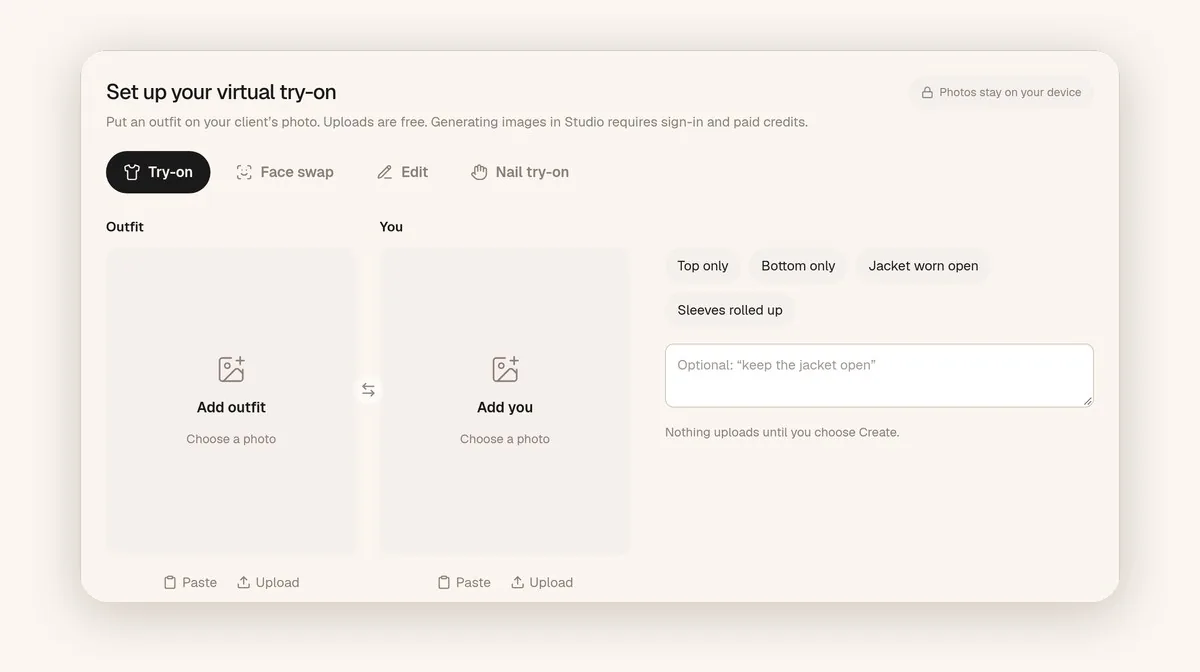
TryAnyOutfit web studio: Outfit and You slots. Choosing images is free. generating uses credits.
We preview a look. We don't measure fit or pick a size. If the generated print or pocket drifts, trust the product photo over the preview, and check the retailer's size chart before you buy.
Getting a usable swap
Honestly, the input photos decide more than the tool does. Use a well-lit, front-facing photo with the area you're changing fully visible. The garment image should show one unfolded item with no hands or bags in the way. If the tool lets you choose, keep the original outfit similar in shape to the new one. Our step-by-step guide to changing clothes with AI goes through this in more detail.
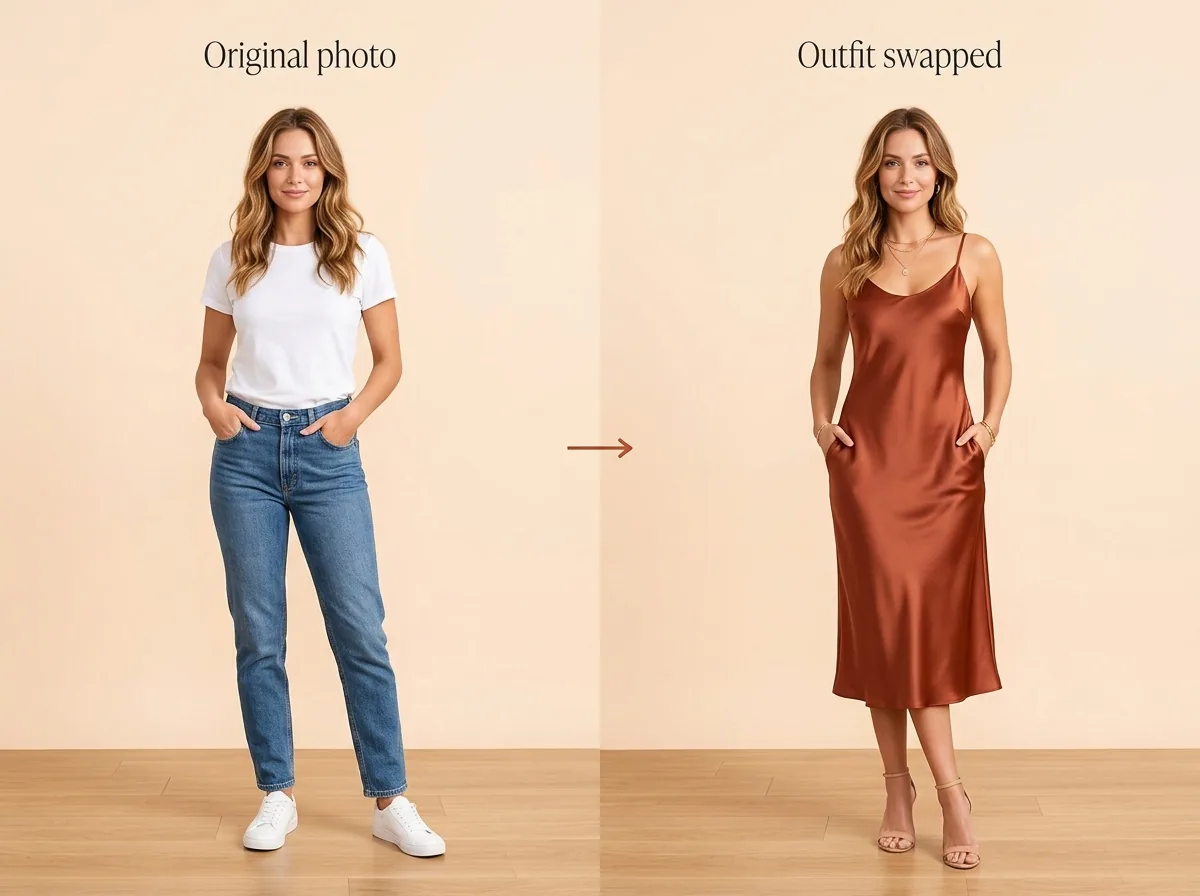
Compare the swap with the product photo before you trust a print, pocket, or hemline.
Then compare the output with the product photo. Generated images can move a pocket, simplify lace or change a print's scale. And no clothes swap measures your body. A result can tell you whether a color or silhouette suits you. The size chart and the return policy still decide whether to order.
Which one to open first
For product-on-model shots without a photoshoot, start with Pincel. Media.io's outfit swap page fits a browser experiment with a prompt-led change. Vidnoz fits a few free casual edits when you're fine logging in to download.
If you want outfit screenshots on your own photo regularly, from your phone, with results saved to an outfit calendar, that's the case TryAnyOutfit is built for. What "free" usually means across this category is covered in Is There a Free AI Clothes Changer?.
Sources
All pages were checked on October 11, 2026. Free limits and credit prices change often, so confirm them on each site before you rely on them.
Items mentioned
- Pincel Clothes Swap: Model + garment uploads; 20 free credits on sign-up; 2 credits per image.
- Media.io AI Outfit Swap: Browser outfit swap with prompt support; page claims free basic unlimited swaps.
- Vidnoz Clothes Changer: Limited free generations per day; login needed to download for free, per FAQ.
- TryAnyOutfit: Store-screenshot try-on on your photo; setup free, every render uses a credit.
Frequently asked questions
Is clothes swap AI the same as a virtual try-on app?
Close, not identical. Clothes swap usually means replacing garments in a photo with another garment image. Virtual try-on apps often wrap that idea in a phone workflow, wardrobe, or shopping features.
Can I swap clothes with a store screenshot?
Some tools expect a clean flat lay. Others, including TryAnyOutfit, are built to take product screenshots and social outfit images. Check what the upload tip on each tool asks for.
Does a clothes swap show how the clothes will fit me?
No. These tools generate a visual preview. They don't measure your body or choose a size. Use the image for color and silhouette, then use the size chart and return policy.
Which clothes swap AI is free?
It depends what free means. Pincel gives 20 signup credits. Media.io's outfit swap page claims free basic swaps. Vidnoz limits free generations and asks you to log in to download. TryAnyOutfit has no free renders.