


TL;DR: Google is piloting a fashion and lifestyle feed called Discover inside the Google Pay app in India, with AI virtual try-on on select clothing items. For now only a limited group of users gets it, and Google hasn't said when that will widen. If you can't see the tab yet, you can still try outfits on your own photo with other tools.
Last checked 4 Nov 2026 against Google's announcement and the Google Pay Help page. We haven't used Discover ourselves, since it's limited to select users, so we can't say how the try-on looks.
News, 3 November 2026. Google Pay is turning into a place to shop for clothes, at least for some people in India. "We are beginning to pilot a new personalised fashion and lifestyle experience inside the Google Pay app in India," wrote Sharath Bulusu, Senior Director of Product Management for Google Pay, on Google's India blog. The new Discover tab mixes a personalised product feed, try-on on your own photo and photo search for similar styles.

Illustration: TryAnyOutfit, generated image. No Google Pay interface shown.
What Google announced
According to Google, the Discover tab is "built on the 60+ billion continually updated products in our Shopping Graph," along with visual search, virtual try-on and YouTube videos. It has three parts:
- A personalised feed. You browse fashion and lifestyle products and YouTube videos picked from your Google activity, and you can react with emoji to see more or less of something.
- Virtual try-on. You upload a photo of yourself, then see how select clothing items look on you from individual product listings. Google says pre-generated daily looks with outfit suggestions are coming soon.
- Find similar styles. Snap or upload a photo of something you like and Discover shows similar products.
You don't pay inside Google Pay for any of it. Tap a product and Google sends you to the merchant's website to buy it.

Image: Google.
Who can use it right now
Not many people, yet. Google calls it a pilot that's "currently limited to a select number of users as we gather feedback." Its Help page says the feature "is currently being rolled out to a limited set of users in India" and gives no date for a wider release. Some Indian outlets call the feature Discover Shop. Google's own pages call the tab Discover.
Google lists two requirements: a personal Google Account, and Web & App Activity plus Search personalisation turned on.
How to check whether you have it
- Update Google Pay to the latest version.
- Look for Discover at the bottom of the app. If it isn't there, you aren't in the pilot yet.
- Open a product to see details like colour and size, then use the try-on option to see it on your photo.
- To buy, follow the link to the merchant's site.
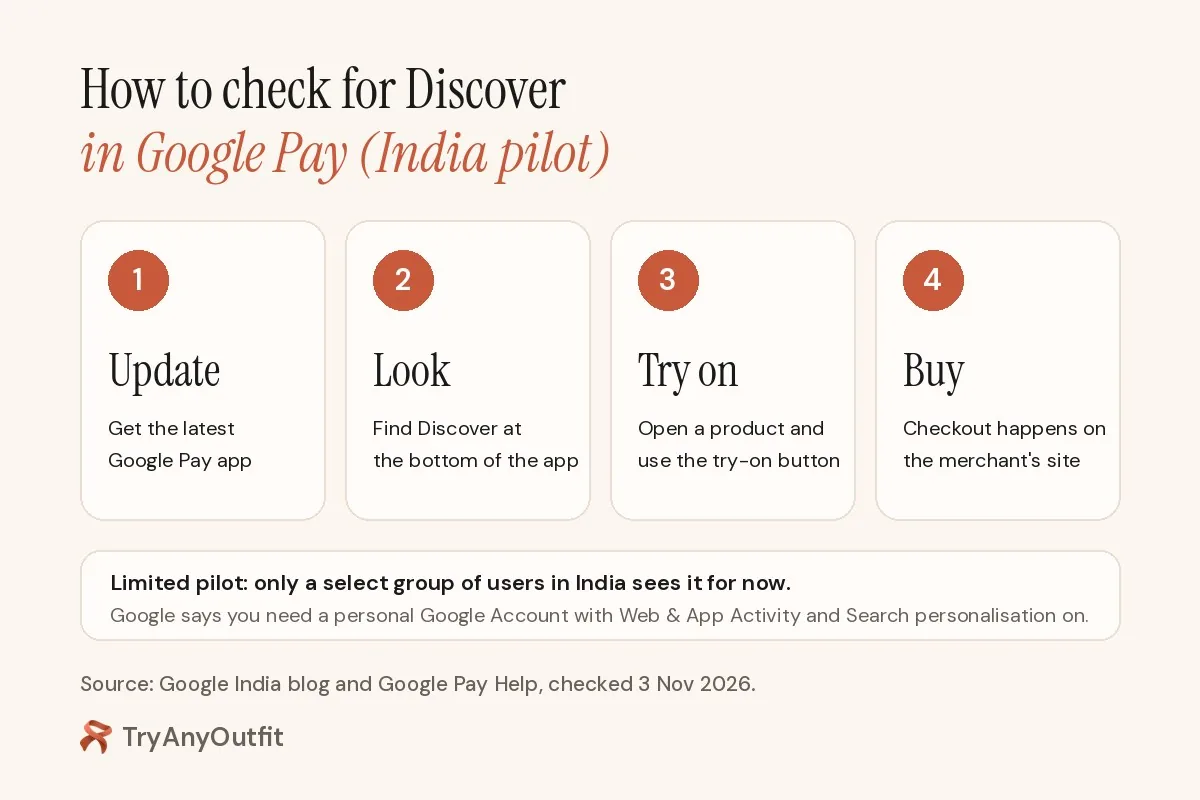
Diagram: TryAnyOutfit, based on Google's India blog and Google Pay Help.
On privacy, Google's Help page says your try-on photo is "used solely to generate the visualisation of you wearing the product," and you can replace it at any time.
Why it matters
Google already offers try-on across Search in India. Since 3 December 2025, a "try it on" icon on apparel listings lets you upload a photo and see clothes and shoes on yourself. We cover it in our Google try-on guide. Discover puts that same idea inside an app many Indians already use to pay.
It's also part of a wider trend. ChatGPT added a Try on button for clothes in October (ChatGPT virtual try-on), and Meta has Style Sketch, which we look at in Meta Style Sketch alternatives. The big platforms want you to try clothes on before you click "buy". Stores are testing it too: Snitch is piloting AI try-on mirrors from Flickd, which we cover in Snitch and Flickd's AI try-on mirrors.
Here's how the options compare.
| Google Pay Discover | Google Search try-on | TryAnyOutfit | |
|---|---|---|---|
| Where | Google Pay app, India | Google Search and Shopping | Phone apps and web Studio |
| What you can try on | Select clothing in the feed | Apparel listings with the try-on icon | Clothes from any photo or screenshot |
| Who can use it | Limited pilot group | Listed regions, India included | Anyone with an account |
| Buying | On the merchant's site | On the merchant's site | Wherever you found the item |
How TryAnyOutfit fits
Google's try-on works on items in Google's catalog. TryAnyOutfit starts from whatever picture you have: an Instagram post, a screenshot from Myntra, a photo of a kurta in a shop window. You add a photo of yourself and a photo of the clothes, and it shows the outfit on your real photo, not an avatar.

Illustration: TryAnyOutfit, generated image of an outfit to try on. Not a Google Pay listing.
So if Discover hasn't reached your phone, or the piece you want isn't in Google's feed, load the photo into the TryAnyOutfit Studio instead. The iPhone and Android apps share credits with the web Studio.

Image: TryAnyOutfit web Studio screenshot, with the generated kurta photo loaded as the outfit. No try-on result shown.
Our guides on finding clothes from a picture and trying on clothes from a store screenshot walk through it. For a wedding or festival outfit, see virtual try-on for events.
TryAnyOutfit isn't a fit or size tool, so check the size chart before you order. There's no free trial, but it's cheap to start: see pricing. Uploaded photos are auto-deleted after 72 hours unless you save them.
For a side-by-side, read TryAnyOutfit vs Google try-on.
Sources
- Google India blog: Introducing a new fashion and lifestyle experience in Google Pay in India
- Google Pay Help: Discover fashion and lifestyle trends on Google Pay
- Google India blog: Virtual apparel try-on tool comes to India (3 Dec 2025)
- Gadgets 360: Google Pay introduces Discover Shop with AI virtual try-on
Frequently asked questions
What is Discover in Google Pay?
Discover is a personalised fashion and lifestyle feed that Google is piloting inside the Google Pay app in India. Google says it is built on the 60+ billion products in its Shopping Graph and combines a product feed, virtual try-on and photo search for similar styles.
Who can use virtual try-on in Google Pay?
Google says the pilot is limited to a select number of users in India while it gathers feedback. You also need a personal Google Account with Web & App Activity and Search personalisation turned on. Google has not given a date for a wider rollout.
How do I check if I have Google Pay Discover?
Update the Google Pay app and look for Discover at the bottom of the screen. If it is not there, your account is not in the pilot yet, according to Google Pay Help.
Can I buy clothes inside Google Pay?
Purchases happen outside the app, since according to Google Pay Help tapping a product sends you to the merchant's website, where you complete the purchase with any payment method that merchant supports.
How can I try on clothes from any photo if I am not in the pilot?
A consumer try-on app works from any clothing image. With TryAnyOutfit you add a photo of yourself and a photo or screenshot of the clothes, and it shows the outfit on your real photo on iPhone, Android or the web. It is not a fit or size tool.