


Google Try On is a button built into Google's shopping results that puts a listed piece of clothing on a photo of you. It makes sense when the item is already in Google's shopping results and you live in one of the 18 countries it supports. A try-on app is the better pick when the outfit came from a screenshot or a store Google doesn't show.
Full disclosure: we make TryAnyOutfit, one of those apps. Still, in our view, Google's tool is the better choice more often than app makers like to admit. Everything about Google below comes from its own help pages and product blog, checked Nov 2, 2026.
Google Try On starts from a product listing. An app starts from whatever picture you saved.
TL;DR
- Use Google Try On for clothes you find in Google's results. You'll need to be 18 or older, signed in, with two account settings switched on.
- Use a try-on app for outfits you saved as screenshots. Sponsored listings belong here too, since they don't get the button.
- Use neither for sizing. Google says its image "does not determine or guarantee the actual fit." TryAnyOutfit doesn't measure fit or pick a size either.
How Google Try On works
Search Google for a top, bottom or dress and open a product. Eligible items show a Try it on button. If there's no button, that item isn't eligible. Upload one photo of yourself and Google generates the look, which you can save or share. Google keeps your uploaded photo so you don't have to add it every time, and you can delete it whenever you like.
Google calls the result a "helpful vibe check." That's a fair description. It shows how a piece might suit your style, not whether it will fit.
The feature also lives in Chrome. On a shopping site that works with it, click the Gemini icon in Chrome's search bar and choose to try the item on. It swaps the model in the store's photo for you, and you can flip back to compare. It doesn't work on managed accounts or ones in a Workspace organization.
In the US there's one more option. You can take a selfie and let Google's Nano Banana model generate a full-body digital version of you. Adding your usual clothing size is optional, and Google says it helps body-shape accuracy.
Who can use it
Google lists four requirements on its help page:
- You're in one of 18 supported countries.
- You're signed in to Google, on mobile or desktop.
- You're at least 18.
- Search Services History and Personalized Recommendations are both on.
The countries, per that page: Argentina, Australia, Brazil, Canada, Chile, Colombia, Hong Kong, India, Indonesia, Japan, Malaysia, Mexico, New Zealand, the Philippines, Singapore, South Korea, the UK and the US.
The settings trip people up most. If the button never appears for anything, check those two settings before you assume the feature is broken.
Google launched try-on in the US in July 2025 after a Search Labs test announced at I/O that May. Shoes came that October, along with plans for more countries. The list has kept growing since.
Where Google Try On stops
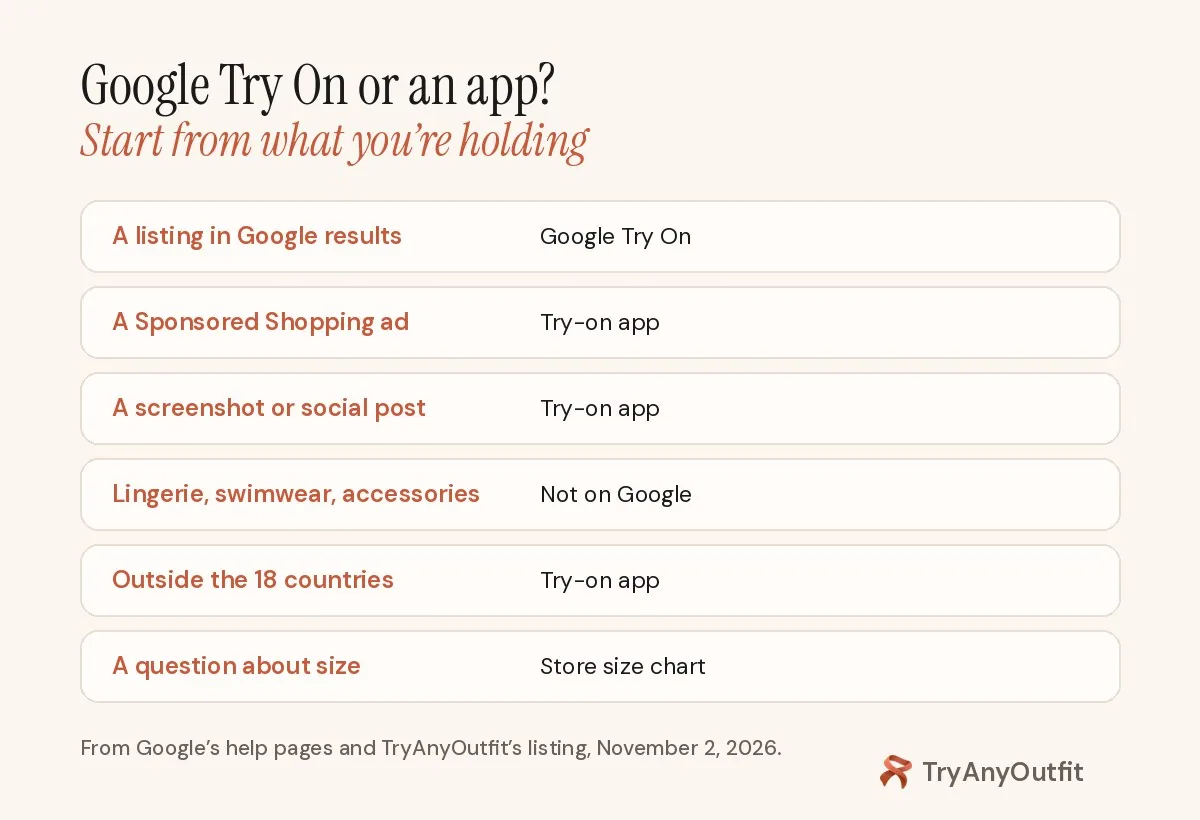
If you're holding a screenshot rather than a Google listing, you're already in app territory.
It only works on listings. The button lives on products Google already shows. A look from Instagram or a picture from a closed group chat has no listing to click.
Sponsored results are out, too. Google's help page says products under "Sponsored" won't have the button, because the feature isn't available for Shopping Ads.
Some categories are excluded. Lingerie and swimwear aren't supported, according to the shopper help page, and neither are accessories. Shoes were added in October 2025, and Google's merchant help lists them as eligible. A hat or a bikini still won't work.
Merchants decide, partly. Retailers with free listings are opted in by default, and their product images need to be at least 512 × 512 pixels. A small shop with tiny images or no Google listing may never get the button.
Accounts and location matter as well. If you're under 18, outside the supported countries or using a managed Workspace account in Chrome, you won't see it.
When a try-on app makes more sense
The honest split is by starting point. Google starts from its own product data. Apps start from an image you give them.
Pick an app when:
- the outfit came from a screenshot or a creator's post
- the shop isn't in Google Shopping, or the result you wanted was a sponsored ad
- you want to change only the top and keep the rest
- you're outside the 18 countries Google lists.
Stay with Google when the item is already in front of you on a Google results page. It's built into the search you were doing anyway, so there's nothing to install before you click through to the store.
Where TryAnyOutfit fits
TryAnyOutfit puts an outfit from any photo or screenshot on your real photo, not an avatar. Upload a picture of yourself and the clothes you saved. The app shows the look on you. You can swap only the top or only the bottom, or type an instruction to recolor a piece.
There are iPhone and Android apps plus a web Studio, and your credits work across all three. Uploaded photos are auto-deleted after 72 hours unless you save them.
There's no free trial. It's cheap to start, and current plans are on the pricing page. Like Google's tool, it gives a preview only. It won't measure fit or tell you which size to buy, so check the store's size chart before you order.

TryAnyOutfit's Studio takes a photo of you and an outfit image from anywhere.
For a side-by-side of features, see TryAnyOutfit vs Google Try-On. If you used Google's Doppl app before it shut down on April 30, 2026, our Doppl alternatives guide covers where each of its features went.
Get a better result from either tool
Google's photo tips work for apps too, and they're specific:
- Use a full-body photo, head to toe, or a selfie, with nobody else in the frame.
- Pick good light and a plain background.
- Stand tall with your hands visible, not in your pockets.
- Wear fitted clothes. Baggy outfits can distort the result.
- Don't sit, crouch, hold the phone too close or shoot from far away.
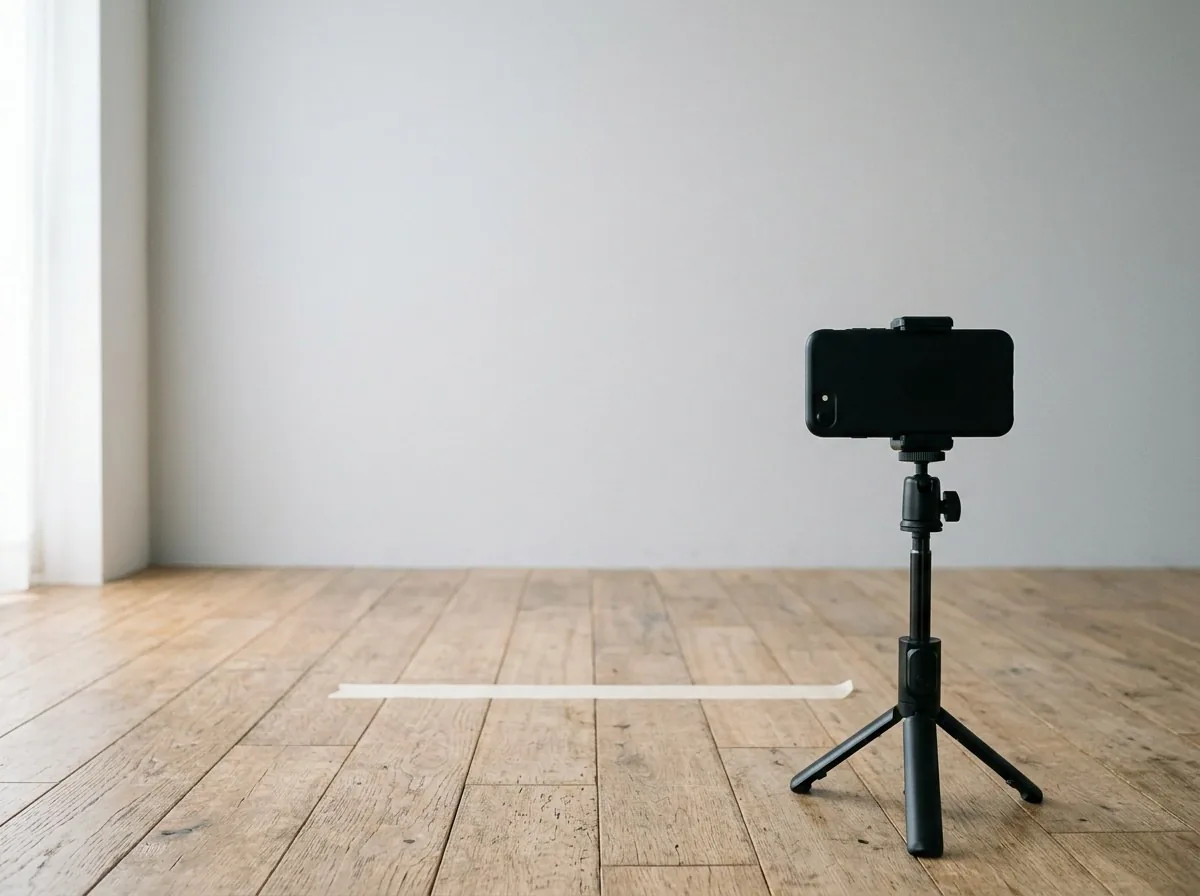
A phone on a tripod against a plain wall covers most of Google's photo advice.
A tripod against a blank wall gets you most of the way. Our guide to the best virtual try-on apps compares more options, and free AI clothes changers covers browser tools.
Sources
Checked on November 2, 2026: Google Shopping Help, "How the Google Try-On tool works"; Google Merchant Center Help, "How Google's Try-on tool works"; Google Chrome Help, "Try on clothes virtually in Chrome"; The Keyword, "Google Shopping's AI updates for back-to-school shopping" (July 24, 2025) and "Google Shopping's try on tool adds shoes, expands to new countries" (October 8, 2025).
Items mentioned
- Google Try On: Built into Google Search, Shopping, Images and Chrome for eligible listings in 18 countries; 18+, signed in.
- TryAnyOutfit: Any outfit image or screenshot on your real photo, not an avatar, on iPhone, Android and web. See pricing at https://tryanyoutfit.com/#pricing.
Frequently asked questions
Is Google Try On free?
We found no charge mentioned anywhere in Google's help pages for it, and you use it while signed in to Search or Chrome.
Why don't I see the Try it on button?
The item may not be eligible, it may be a sponsored ad, or your account may not meet the rules. Google requires you to be 18 or older and in a supported country, with two account settings on: Search Services History and Personalized Recommendations.
Does Google Try On work for shoes?
According to Google's October 2025 announcement and its merchant help, shoes are eligible now. The shopper help page hasn't caught up, so expect some gaps.
Does Google keep my photo?
It saves your uploaded photo so you can reuse it, and you can delete it any time. Google says it doesn't store biometric data or use the photo for training. Trained human reviewers do evaluate image quality, with data disconnected from your account.
Can I try on clothes from a screenshot with Google?
Google's button sits on its own product listings, so a screenshot has nowhere to go. For that, use a try-on app such as TryAnyOutfit.
Does either tool tell me my size?
Google says its image doesn't determine or guarantee fit. TryAnyOutfit is a visual preview too, so use the store's size chart.