


TL;DR: Pincel's Clothes Swap is a browser tool for dressing a model photo in a garment, at 2 credits an image, inside a suite of 50+ tools with paid plans from $19 a month. For free swaps without an account, try Magic Hour or bitStudio. Kling AI is better for combining several pieces, and FitRoom or TryAnyOutfit make more sense on a phone when it's your own photo.
Pincel is good at what it was built for. It's a business image editor, and Clothes Swap is one of more than 50 tools aimed at sellers and marketing teams. If you only want to see a jacket on yourself, I think you'd be paying for a lot you won't use. Here's what Pincel actually offers, then five alternatives sorted by what you're trying to do.

Every tool here starts with a photo of a person and a photo of the clothes.
What Pincel's clothes swap does
On its Clothes Swap page, Pincel asks for a model image and a garment image. Generating takes 30 to 50 seconds, and each image costs 2 credits. Pincel's tip is to use a garment photo without a model, such as a cutout or flat lay.
There's a catch it states plainly. The original outfit and the new garment should be the same type, shirt for shirt or dress for dress. That matters most for dresses and trousers, the FAQ says, because otherwise the AI favors the upper body. It also warns that the tool may change the original clothing and photo to blend the new outfit in.
Pricing, as listed on November 10, 2026:
| Plan | Price | Credits | Clothes swaps at 2 credits |
|---|---|---|---|
| Starter | Free | 20 credits, no card | 10 |
| Creator | $19/month | 1,000 a month | 500 |
| Premium | $79/month | 5,000 a month | 2,500 |
| Restless | $199/month | 15,000 a month | 7,500 |
Top-up packs cost the same amounts and never expire. Plan credits carry over while your subscription is active. Pincel says you keep full commercial rights to what you make, and it offers a no-questions refund. It runs in the browser, and we found no Pincel app in a US App Store search.
In practice, Pincel is for a shop owner dressing models in their own stock. For personal outfit ideas, the free options below get you started faster.
Pincel alternatives at a glance
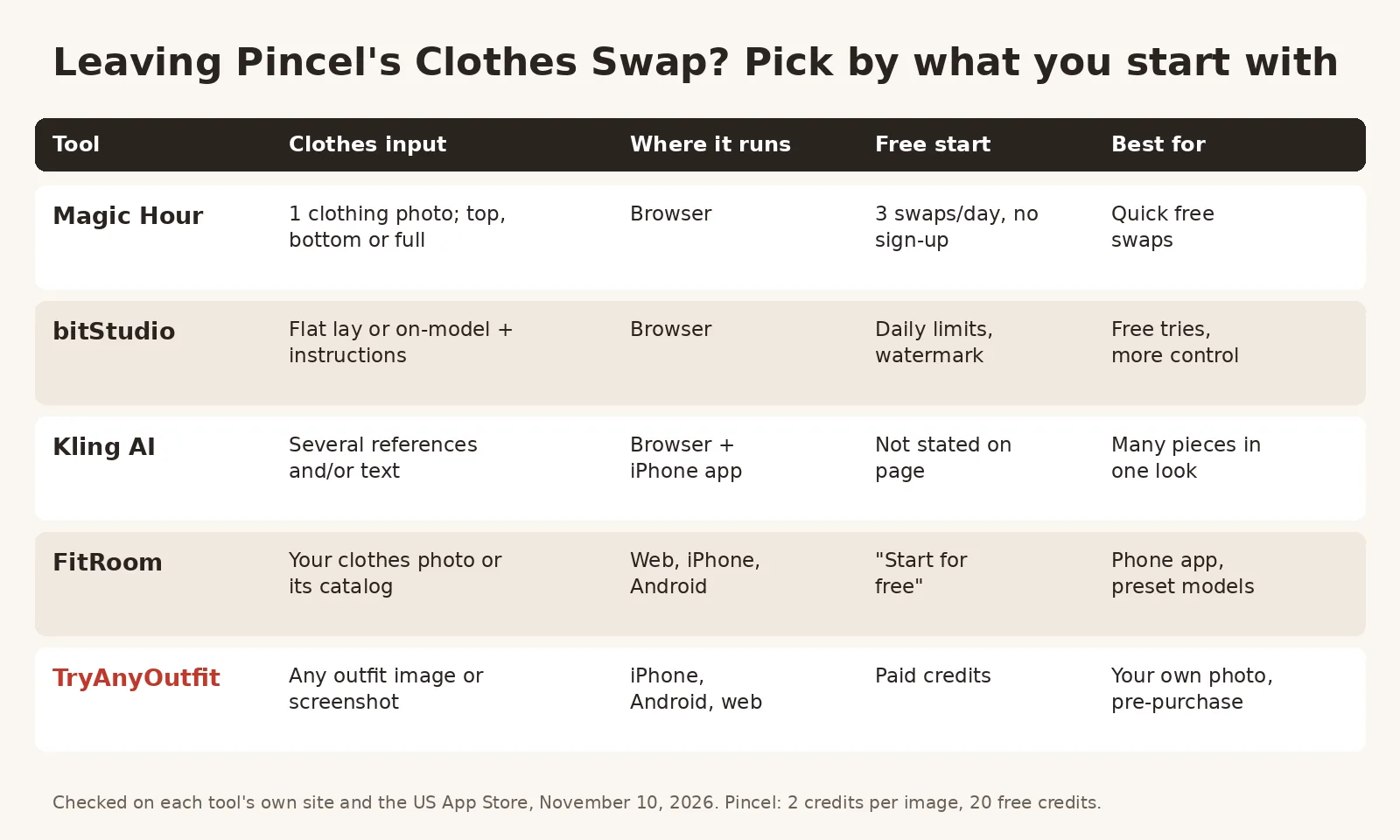
Checked on each tool's own site and the US App Store, November 10, 2026.
| Tool | Clothes input | Where it runs | Free start | Best for |
|---|---|---|---|---|
| Magic Hour | One clothing photo; upper, lower or full outfit | Browser | 3 swaps a day, no sign-up | Quick free swaps |
| bitStudio | Flat lay or on-model photo, plus instructions | Browser | Daily limits, watermarked | Free tries with more control |
| Kling AI | Several reference images, a text prompt, or both | Browser, App Store app | Not stated on the page | Building a look from many pieces |
| FitRoom | Your clothes photo or its catalog | Browser, iPhone, Android | "Start for free" | A phone app with preset models |
| TryAnyOutfit | Any outfit image or store screenshot | iPhone, Android, web | Paid credits, cheap to start | Your own photo before you buy |
1. Magic Hour: free swaps with no account
Magic Hour's AI clothes changer works much like Pincel's. Upload a person photo and a separate clothing photo. Then pick how much to replace: the top half, the bottom half, or everything. That choice is the difference. You tell it what to replace, rather than matching garment types yourself.
You get 3 free swaps a day with no sign-up and no watermark. With a free account, each swap costs 25 credits, and more come with paid plans or credit packs. Commercial use needs one of those paid options; free users are limited to personal use. Magic Hour also says it doesn't train on your uploads, and that results don't guarantee real-world fit or color.
2. bitStudio: free tries, with a watermark
bitStudio needs no login either. The outfit image can be a flat lay or someone already wearing it, which Pincel advises against. There's an optional box for custom instructions too.
Quality has three levels: Turbo is free, Standard costs 1 credit and Max costs 2. Free results carry a watermark and have daily limits. Its page says signing up gets you higher quality and no watermarks. bitStudio says you own the images you create whether you pay or not, and it sells a virtual fitting room for Shopify stores. That makes it the closest match for sellers who like Pincel's model-dressing angle.
3. Kling AI: when one garment isn't enough
One garment per image is Pincel's limit. Kling's clothes changer, built on its IMAGE 3.0 Omni model, takes numbered references. Image 1 is the person, Image 2 the shirt, Image 3 the jacket, and so on through skirts and shoes. You can add a text prompt on top, or skip the references and describe the change.
Output goes up to 2K or 4K. The page doesn't list a price, and for commercial use it points you to Kling's terms and your plan. Its iPhone app is rated 4.7 from about 33,700 App Store ratings.

A flat, evenly lit clothes photo gives any of these tools a cleaner garment to work with.
4. FitRoom: a phone app with preset models
FitRoom is the pick if you'd rather use an app, with iPhone and Android versions next to its website. Upload an outfit image or pick from its catalog. Then use your own photo, or one of its preset models. FitRoom says swaps take 10 to 15 seconds and that it encrypts uploads and deletes images after processing. There's an API for shops as well.
The website says "Start for free." On the US App Store it's rated 4.6 from 258 ratings. In-app purchases include a $4.99 weekly plan and yearly plans at $29.99 and $39.99. We compare it with our app in TryAnyOutfit vs FitRoom.
5. TryAnyOutfit: your own photo, before you buy
We make TryAnyOutfit, so weigh this one with that in mind. It isn't built for product shoots like Pincel. It's for the moment you've found something in a shop or on social media and want to see it on you. Add a clear photo of yourself and any outfit image, including a store screenshot. The result uses your real photo, not an avatar or a stock model.

Overshirt uploaded, Top only selected. Add your photo next, then generate in Studio. Screenshot taken November 10, 2026.
Top only keeps your own trousers, and Bottom only does the reverse, so you don't need to match garment types first. Use it on a phone or in the web Studio; credits are shared. There's no free trial, but it's cheap to start; see pricing. Uploaded photos are auto-deleted after 72 hours unless you save them. It previews a look. It won't measure fit or pick your size.
Which Pincel alternative should you pick?
I'd decide by what you have and who the photo is for:
- A single clothes photo and no budget: Magic Hour.
- Flat lays and a few free tries, with a watermark you can live with: bitStudio.
- Several garments or a text-only idea: Kling AI.
- A phone and preset models: FitRoom.
- A store screenshot and your own photo: TryAnyOutfit.
If you're dressing models to sell clothes and want 50 other editing tools on the same account, Pincel is still a reasonable choice. Our best AI clothes changers guide covers more tools, free AI clothes changers sorts them by what free really means, and how to change clothes with AI covers getting a clean result.
Sources
Checked on November 10, 2026, on each tool's own pages and the US App Store.
Items mentioned
- Magic Hour: Browser clothes changer with upper, lower or full-outfit modes and 3 free swaps a day without sign-up.
- bitStudio: Browser clothes changer that accepts flat lay or on-model outfit photos, free with daily limits and a watermark.
- Kling AI: IMAGE 3.0 Omni clothes changer that combines several reference images and text, up to 4K.
- FitRoom: Web, iPhone and Android try-on with your photo or preset models, plus an API.
- TryAnyOutfit: Previews an outfit from any photo or screenshot on your real photo, on iPhone, Android and web.
Frequently asked questions
What is Pincel AI?
Pincel is a browser-based AI image editor for businesses with more than 50 tools, including Clothes Swap, which dresses a model photo in a garment image.
How much does Pincel cost?
As of November 10, 2026, Pincel gives 20 free credits with no card. Paid plans are Creator at $19 a month for 1,000 credits, Premium at $79 for 5,000 and Restless at $199 for 15,000. A clothes swap costs 2 credits.
Is there a free alternative to Pincel for changing clothes?
Magic Hour gives 3 free clothes swaps a day with no sign-up and no watermark. bitStudio has a free Turbo level with daily limits and a watermark.
Does Pincel have an app?
Pincel runs in the browser. We found no Pincel app in a US App Store search on November 10, 2026. FitRoom, Kling AI and TryAnyOutfit have iPhone apps.
Which alternative can combine several pieces of clothing?
Kling AI takes numbered reference images, such as a shirt, a jacket and shoes, and can also follow a text prompt.