


TL;DR: Vmake AI now calls itself Vmake Labs, a social video studio that turns one product photo into short ads. The Free plan gives 20 credits a day, and Plus costs $9.99 a month. Pippit is the closest replacement. Creatify is stronger on AI actors for paid ads, and Botika makes catalog photos before any video. For fixing footage, use Topaz Video, and for captions, CapCut. If you just want to see an outfit on yourself, TryAnyOutfit does that.
If you remember Vmake as an AI fashion photo tool, that's not really what vmake.ai sells anymore. The site now calls itself "the ultimate AI social video studio", and nearly every feature points at short product videos for TikTok and Reels. So I'd pick a replacement by the job you actually used it for, whether that was product videos, cleaning up footage or getting model photos.
A product, a phone, decent light. Every tool below starts from roughly this setup.
What Vmake does now
You upload a product image, add your selling points and pick a style. Vmake Labs builds the video. Its UGC tool offers Product showcase and AI avatar video, where an AI spokesperson presents your product. A third workflow, Recreate video, copies the structure of a clip you upload as a reference. The fashion page goes further. It promises styling videos and even "try-ons" made from one product image, with no shoot.
The older utilities are still there. You'll find a video enhancer and upscaler next to background removal. There's also a menu of outside models such as Seedance or Nano Banana. On the US App Store, "Vmake Labs: create viral video" from Starii Tech Pty Ltd had a 4.8 rating from 5.3K ratings.
Pricing, checked November 14, 2026:
| Plan | Price | Credits |
|---|---|---|
| Free | $0 | 20 a day, with a watermark |
| Plus | $9.99/month | 1,000 a month, commercial use |
| Pro | $29.99/month | 4,500 a month, batch up to 30 files |
Yearly billing is up to 42% off. Watch the credit math, though. Vmake's own table says Plus covers up to 6 Seedance 2.5 videos a month, which isn't many if you post daily.
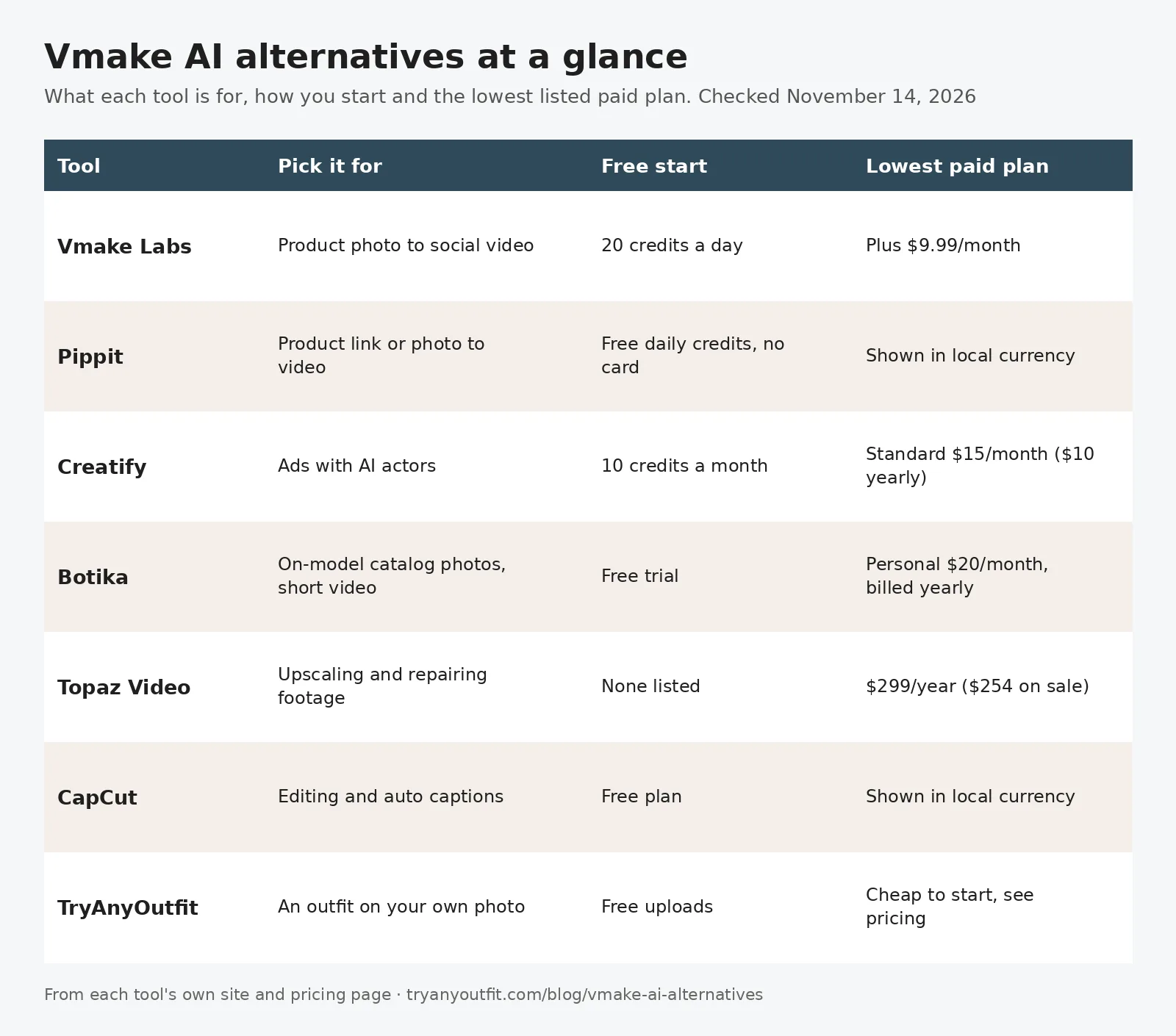
From each tool's own site and pricing page, checked November 14, 2026.
| Tool | Pick it for | Free start | Lowest listed paid plan |
|---|---|---|---|
| Pippit | Product link or photo to video | Free daily credits, no card | Shown in local currency |
| Creatify | Ads with AI actors | 10 credits a month | Standard $15/month ($10 billed yearly) |
| Botika | On-model catalog photos | Free trial | Personal $20/month, billed yearly |
| Topaz Video | Upscaling footage | None listed | $299/year ($254 in its current sale) |
| CapCut | Editing and auto captions | Free plan | Shown in local currency |
| TryAnyOutfit | An outfit on your own photo | Free uploads | Cheap to start; see pricing |
1. Pippit: the closest like-for-like
Pippit covers most of the same ground as Vmake. Its Anything to Video tool turns a link or a photo into a marketing video. Reference Video borrows a trending clip's script and structure for your product, much like Vmake's Recreate. Avatar videos are in there too.
The Free plan needs no card and refills credits daily. Paid plans add credits and drop the watermark. Its pricing page showed us euros for our region, so check what it shows you before you compare it with Vmake's dollar plans.
2. Creatify: AI actors for paid ads
If you mostly used Vmake for the AI spokesperson videos, Creatify leans much harder into that. It's built for ads, with URL to Video and Ad Clone up front and an Ad Agent that connects to your ad accounts.
The Free plan has 10 credits a month. Creatify says that's enough for up to 2 video ads, with 300 AI actors and a watermark. Standard is $15 a month, or $10 a month billed yearly, for 55 credits. Pro costs $55 ($38 yearly) and adds 1,500 actors. Unused credits roll over for one extra month.
3. Botika: model photos first, video second
Vmake assumes you already have decent product photos. Botika handles the step before that. Upload the product photos you have and it returns on-model photos, plus short videos if you want them. A 5-second video from any image costs 130 credits. A Standard 2K on-model photo costs 30.
The Personal plan is $20 a month, billed $240 yearly, with 10,080 credits up front. Botika puts that at roughly 350 Standard photos or 80 videos. For more photo-first tools, see our WeShop AI alternatives.

A flat, evenly lit product shot like this one is what all of these tools read best.
4. Topaz Video: when the footage is the problem
Plenty of people only ever opened Vmake's enhancer to rescue a blurry clip. If that's you, go to a specialist. Topaz Video runs on Mac and PC with unlimited local rendering, and a browser version exists too. Both list at $299 a year. When we checked, a Black Friday sale had cut that to $254.
One catch. These are personal-use licenses, and Topaz says organizations with more than $1M in annual revenue need Pro. Topaz Video Pro is $699 a year.
5. CapCut: captions and editing
Vmake has a caption generator and a basic editor. CapCut is a full editor. It comes with an auto caption generator and plenty of templates, and its Free plan covers basic editing. Pro and Ultra add monthly AI credits. CapCut says displayed prices are for reference only and depend on your account; it showed us euros. It won't build a product video from one photo the way Vmake does. Where it shines is finishing one.
6. TryAnyOutfit: when the model should be you
We make TryAnyOutfit, so weigh that. It isn't an ad studio at all. It's for the moment you spot a sweater in a shop or on Instagram and want to know how it looks on you before buying. Add a clear photo of yourself and any outfit image, even a screenshot, and it puts the look on your real photo instead of an AI model.

Sweater uploaded, Top only selected so the rest of your outfit stays. Your photo goes on the right. Screenshot taken November 14, 2026.
Top only keeps the trousers you're already wearing in the picture. In the app, Motion Video turns a try-on into a 5-second clip, which works for a quick post asking friends whether to buy it. You can use it on iPhone, Android or the web Studio, and credits are shared between them. It's cheap to start; see pricing. Uploaded photos are auto-deleted after 72 hours unless you save them. A preview shows how a piece looks on you. It doesn't measure fit or pick a size.
Which one should you pick?
For the same photo-to-video workflow, I'd start with Pippit. Running paid ads with AI presenters points to Creatify. A collection that still needs model photos is Botika's job. Topaz fixes footage, and CapCut finishes the edit. And if you only want to see clothes on yourself, skip the ad tools entirely. Try TryAnyOutfit or one of our best AI clothes changers.
There's more on swapping clothes in a photo on our AI clothes changer page and in the bitStudio alternatives roundup.
Sources
- Vmake Labs with its pricing, UGC video and fashion pages
- Vmake Labs on the App Store
- Pippit with its pricing page
- Creatify pricing
- Botika pricing
- Topaz Labs pricing
- CapCut pricing
Items mentioned
- Pippit: Turns a product link or photo into marketing videos, with a free plan of daily credits.
- Creatify: UGC-style video ads with AI actors, from $15 a month or a free plan with 10 credits.
- Botika: On-model catalog photos and short videos from your product photos.
- Topaz Video: Desktop and browser video upscaling and repair.
- CapCut: Video editor with auto captions and templates, with a free plan.
- TryAnyOutfit: Puts an outfit from any photo or screenshot on your own photo, on iPhone, Android and web.
Frequently asked questions
What is Vmake AI now?
As of November 14, 2026, vmake.ai presents itself as Vmake Labs, an AI social video studio made by Starii Tech. It turns a product image into short UGC-style videos and still includes its older video enhancer.
How much does Vmake cost?
Vmake Labs has a Free plan with 20 credits a day and a watermark. Plus is $9.99 a month for 1,000 credits and Pro is $29.99 a month for 4,500 credits, with up to 42% off on yearly billing (checked November 14, 2026).
What is the best Vmake AI alternative?
For the same product-photo-to-video workflow, Pippit is the closest match. Creatify is stronger if you run ads with AI actors.
Is there a free alternative to Vmake?
Pippit has a Free plan with daily credits and no card required. Creatify's Free plan gives 10 credits a month, with a watermark on exports.
Can I use these tools to see clothes on myself?
Vmake and most alternatives put products on AI models. To see an outfit on your own photo, use a virtual try-on such as TryAnyOutfit. A preview shows the look, not the fit, so still check the size chart.