


TL;DR: A virtual wedding dress try-on puts a gown on a full-length photo of you, so you can compare necklines and skirts before booking appointments. Kleinfeld Again does it for its own listings. Weddie and TryAnyOutfit work from a photo of any dress. David's Bridal shows selected gowns in 3D and AR instead of on your photo. None of them can tell you the fit. The salon still does that.
Can you see a wedding dress on yourself before the first appointment? Mostly, yes. The phrase covers two different things, though. One puts the gown on your own photo. The other shows a 3D gown you can spin around or place in your living room, with no photo of you involved. I'd use the first to narrow down silhouettes and the second to look at details, then take a short list to a salon.

A gown and a phone on a tripod. That's most of the setup.
We make TryAnyOutfit, one of the options below. The other tools are described from their own pages, checked November 20, 2026, not from hands-on tests.
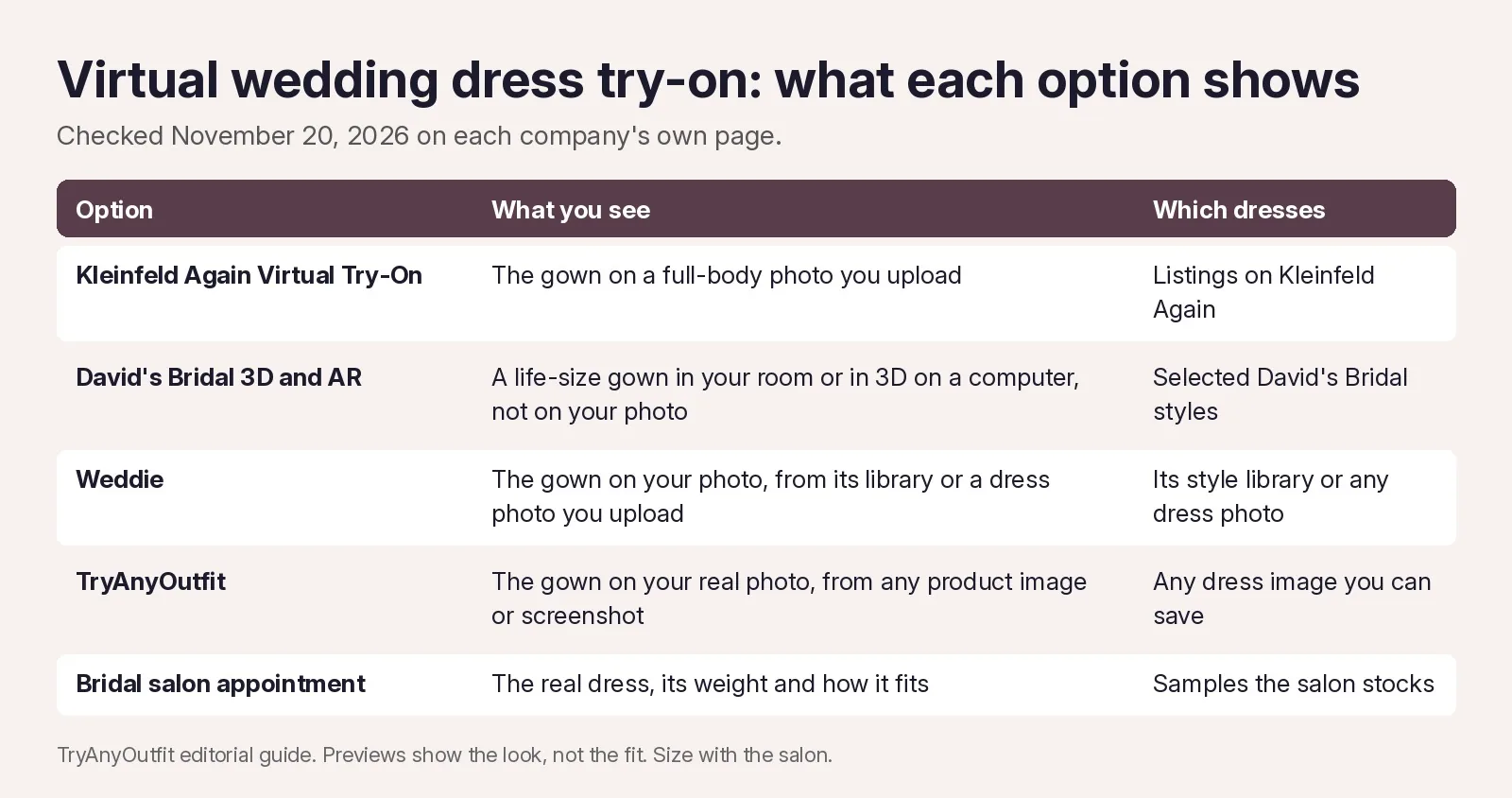
What each option shows, and which dresses it works with.
Kleinfeld Again: gowns from its own listings
Kleinfeld Again is a consignment marketplace under the Kleinfeld name that sells pre-owned and sample gowns. Its Virtual Try-On page says you find a dress, click "Virtual Try-On," upload a photo of yourself and see the result in seconds. You can reuse the same photo for other dresses later. The catch is the catalog. It works for gowns listed on Kleinfeld Again, not for a dress you saw somewhere else.
Kleinfeld Again also runs Try On First appointments. You book a 15-minute in-store try-on from the product page. Its page listed the fee as $30 per gown on November 20, 2026. Appointments are at the Kleinfeld store in New York City or at Brides by Lola Dre in Jupiter, Florida. The main Kleinfeld Bridal FAQ says the salon itself typically doesn't offer virtual shopping, though it does run video appointments with a consultant.
David's Bridal: 3D and AR, not your photo
David's Bridal has a 3D and AR shopping page. You can see selected dresses in 3D on a computer, or point your phone at the floor to place a life-size dress in the room, turn it 360 degrees and zoom in on the embellishments. That's useful for lace and beading. You also get a sense of how a train spreads out. It doesn't put the gown on you, and it only covers the styles David's Bridal has added to its 3D and AR range.
Weddie: AI try-on inside a wedding planner
Weddie's virtual wedding dress try-on page says you upload your photo, then choose one of its ready styles or upload a photo of a dress from an online store. It says a result takes about 15 to 30 seconds and that you can save and share looks. Pricing isn't on that page. It says the try-on is part of the AI Planner package and links out for prices.
TryAnyOutfit: any gown on your real photo
TryAnyOutfit puts an outfit from any photo or screenshot on your real photo, not an avatar. For a wedding dress, any screenshot works as the outfit. A designer's site is fine. So is a boutique's Instagram post or a resale listing. It works on iPhone and Android, and in the web Studio in your browser. Credits are shared. It's cheap to start; see pricing. Uploaded photos are auto-deleted after 72 hours unless you save them.

An ivory lace gown in the Outfit box, waiting for a full-length photo. Screenshot taken November 20, 2026.
How to get a useful preview
Start with the photo of you. Kleinfeld Again and Weddie both ask for much the same thing, and I agree with them. Your whole body should be in frame from head to toe. Stand straight, face the camera and use good light against a plain, light wall. Fitted clothes help, because a baggy sweater gives the tool the wrong shape to work with.

A tripod, a plain wall and a tape mark on the floor. Set the phone at about waist height.
Then pick the dress image. Choose one that shows the whole gown, neckline to hem, with nothing cut off at the train. A ghost-mannequin or flat product photo works well. So does a shot on a model, as long as the skirt is fully in frame.

A full-length product shot gives the preview the whole skirt to work from.
Run the same photo through every gown you're comparing. If you change the photo between dresses, you're comparing photos, not dresses. Try two necklines on one silhouette. Or keep the neckline and swap an A-line for a sheath. Side by side, the differences are easy to see.
What a virtual try-on can't tell you
A preview shows the shape and the color against your skin. That's all. It can't show how heavy satin feels, how a corset sits, or whether you can sit down in a mermaid skirt. It doesn't measure fit or choose a size. Wedding gowns are often ordered by measurement and altered afterwards, so take your short list to a bridal salon and let them handle sizing.
Sources, checked November 20, 2026: Kleinfeld Again Virtual Try-On, Kleinfeld Again Try Before You Buy, the Kleinfeld Bridal FAQ and virtual appointments page, David's Bridal 3D shopping and Weddie's virtual wedding dress try-on page.
For dresses beyond bridal, our roundup of AI dress changer apps compares four tools, and the best virtual try-on apps list covers the wider field. Choosing for the rest of the party? How I Picked My Mismatched Bridesmaid Dress is an illustrative story about matching dresses on one photo, and our bridal shower outfit ideas help with the earlier events.
Items mentioned
- Kleinfeld Again Virtual Try-On: Upload a full-body photo to see gowns listed on Kleinfeld Again.
- David's Bridal 3D and AR: View selected gowns in 3D or place them life-size in your room with AR.
- Weddie: AI try-on from its style library or any dress photo, part of its AI Planner.
- TryAnyOutfit: Any gown image or screenshot on your real photo, on iPhone, Android and web.
Frequently asked questions
Can I try on wedding dresses virtually?
Yes. Some tools put a gown on a full-length photo you upload, such as Kleinfeld Again for its listings, Weddie and TryAnyOutfit. David's Bridal instead shows selected gowns in 3D and AR, not on your photo.
What photo should I use for a virtual wedding dress try-on?
A full-length photo from head to toe, standing straight and facing the camera, in good light against a plain, light background. Fitted clothes give the best shape to work from.
Can I try on a dress from another store?
With tools that accept any dress image, yes. Weddie and TryAnyOutfit both work from a photo or screenshot of a dress. Kleinfeld Again's try-on works with gowns listed on its own site.
Can a virtual try-on tell me my wedding dress size?
No. A preview shows the silhouette, neckline and color on your photo. It does not measure fit or choose a size, so a bridal salon still handles sizing and alterations.