



Yes. An AI bikini try-on app overlays a swimsuit on your photo. Most results for bikini try on are haul videos. Free web tools usually generate a new image. TryAnyOutfit photo setup is free. Rendering needs paid credits.
The useful question is whether an app can help you choose between the bikinis you are considering. A convincing image of a different swimsuit won't tell you much about the one in your shopping basket. Look for a tool that accepts both your own photo and an image of the actual product, and check the generated details before using it to make a purchase.
Written by the TryAnyOutfit Team, the team behind the app and web Studio. This guide explains our product's workflow and limits; it is not a ranking of apps tested against one another.
Yes, there is an AI bikini try-on app
TryAnyOutfit lets you select a photo of yourself and a separate bikini reference, then carry them into Studio to create a paid preview. In an ai bikini try on workflow, the swimsuit image supplies the garment you want to see, while your photo supplies the person and pose.
“Overlays” is useful shorthand, but the process creates a new image. It can redraw straps, change a print or alter proportions. A result that looks like a photograph still needs checking against both inputs.
For shopping, choose an app based on the decision you need help with. Comparing a navy bikini with a coral one is a visual question. Finding out whether a band pinches or a top stays secure while swimming requires information the preview cannot provide.
Our bikini shopping guide explains which colors, patterns and combinations are useful to compare before ordering.
Bikini try-on, AI generator or haul: which do you need?
A haul shows someone wearing and discussing real purchases. It can help you see how fabric moves or hear about a fastening, although the creator's measurements and preferences may be different from yours.
An AI bikini generator can create a swimsuit image from a description or edit an existing picture. If you ask for a blue bikini without providing a product reference, the output may show an invented design. That can help with outfit ideas, but it gives you no evidence about a particular item a retailer sells.
A photo-based try-on uses a garment reference alongside the person photo. That gives you a specific product to compare with the result. Check whether the app accepts the reference you want to use before spending time preparing your images.
The labels overlap. A tool called a generator may accept reference images, and a tool called a try-on may still change the garment. Judge the available inputs and inspect the output rather than relying on the name.
How to add a bikini to your photo
A photo to bikini preview starts with two clear inputs. Keep the original files so you can check the result against them afterward.
- Choose your person photo. Use even light and a front-facing pose, with your torso and hips visible. Keep your hands, hair and bag away from the area where the swimsuit will appear. A face-only selfie leaves out too much of the body. You can start with a clothed photo; bulky layers make the outline harder to interpret.
- Choose the exact bikini reference. Include both pieces, straps and ties. A clear product photo is easier to assess than a collage of several styles. Crop away shopping buttons and unrelated products, but keep the whole garment. Check that the image shows the colorway you intend to buy.
- Review the inputs in Studio. The public setup page carries your selections into the editor. Continue in the same browser and device, sign in, and review your choices and credits before generating. Keep the person photo in the person slot and the bikini in the garment slot.
The photo setup guide covers supported files and common input problems if you need more detail.
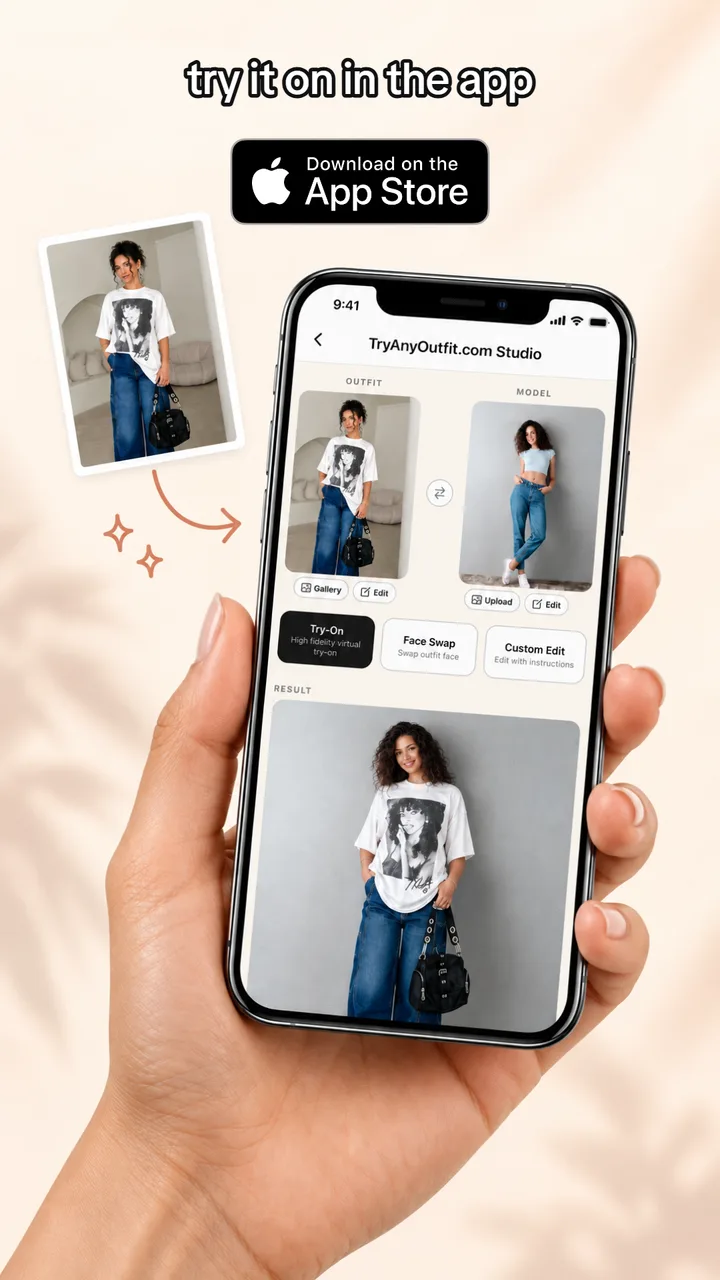
In this example, the reference shows a graphic T-shirt, wide-leg jeans and a black bag. The separate person photo shows a pale blue top and jeans. The displayed result adopts the reference outfit, which makes the role of each input easier to understand. It does not establish how accurately a bikini's straps or coverage would be preserved.
Compare two styles using the same photo
Choose two products that answer a real shopping question, such as a solid scoop-neck bikini and a printed triangle bikini. Use the same source photo, output settings and framing for both. Otherwise, different lighting or a new pose can influence your preference more than the swimwear does.
Keep each product reference beside its result. For the scoop-neck style, check whether the neckline, strap width and waistband still match. For the triangle style, inspect the ties, cup edges and print placement. These are details to check, not a claim that either style has been tested here.
If the generated scoop neckline becomes a deep V, you are comparing a different design. If a side tie disappears, the image no longer shows that fastening accurately. A changed detail is a reason to question the preview, even if you prefer the resulting image.
Check the person as well. Changes to the waist, shoulders or pose can make a swimsuit look different for reasons unrelated to the product. Keep an attractive result separate from an accurate reference when deciding what to order.
What free actually means
If you searched for bikini try on free, check which step the offer covers. Uploading a photo, receiving a trial credit, seeing a preview and downloading an image are different things. A free setup screen does not establish that the final image is free.
For TryAnyOutfit, selecting and replacing photos on the public page costs nothing. Generating the preview in Studio requires an account and paid credits. There is no free generation offer to unlock by signing up.
One generated image uses one credit. Comparing two styles with one result for each therefore uses two credits. If you generate another version, budget for that additional image too. Review the current packs or subscription options before checkout instead of assuming that the word “free” in a search result describes the whole process.
Before using any tool's free offer, check its image allowance, download limits, watermark rules and whether a subscription starts afterward. Read what happens to uploaded photos as well. We have not tested competing services' free allowances for this article, so we cannot tell you that one provides the best deal.
The free setup and paid generation explanation sets out the difference for TryAnyOutfit.
App or browser
A bikini try on app is useful if your product screenshots and personal photos already live on your phone. TryAnyOutfit is available on iPhone and Android, and its web Studio works in a browser. Use the same account across the app and website to access your credits.
The browser may be more convenient when you are comparing several retailer tabs on a laptop. You can prepare the two images on the public page and continue to Studio without installing an app.
For a first comparison, choose the device where you can inspect the original product image comfortably. Small straps and repeated prints deserve a closer look than a thumbnail provides. A larger screen can make those checks easier, but it does not improve the accuracy of an already generated image.
What a preview cannot tell you
An AI image does not measure your body or establish the size you should buy. It cannot tell you how elastic feels against your skin, whether a clasp is comfortable or how much support a top provides. It also cannot verify what the fabric looks like when wet.
Return to the retailer's size chart and construction details before choosing a size. Check whether the top and bottom can be ordered separately if you need different sizes. Compare the original front and back product photos for coverage, lining and fastening details.
Read the return conditions before ordering swimwear, including any hygiene-seal requirements. Use the preview to help narrow a visual choice, then use the actual product information to decide whether that choice is worth buying.
Is there an AI app that can put me in a bikini?
Yes. TryAnyOutfit accepts your photo and a bikini reference to create a visual preview in Studio. Preparing the photos is free; generating the image requires paid credits. The result can change garment details and does not confirm fit.
Is there an app that lets you try on clothes virtually?
Yes. TryAnyOutfit supports clothing previews using a person photo and an outfit image. The same basic workflow can help compare swimwear and other outfits, with the same need to check generated details against the originals.
How can I add a bikini to my photo?
Select a clear photo of yourself and an image of the bikini you want to preview. Open both in Studio, check their placement and generate with paid credits. Inspect the result's straps, pattern and proportions before using it to shop.
What app can change the clothes in photos?
TryAnyOutfit can create an image showing a different outfit from a garment reference. Use your own photo or one you have permission to edit. Because the output is generated, it may change details beyond the clothing you intended to replace.